Overlay, Alert & Emote Affiliate Programs (2026)
StreamerPerks earns a commission from some outbound links. How programs are checked and how the site is funded.
The two stream-design shops with open, public affiliate programs are OWN3D (30% on all products, payout at €100) and Nerd or Die (10% to start, rising to 30% by tier, payout at $10). For templates and custom work, Placeit pays $50 per new annual subscriber, Fiverr pays 25% of a referred buyer's first order plus 10% of their orders for 12 months, and Etsy's Creator Collective covers independent emote artists. Visuals by Impulse and Canva are not realistic options right now; the reasons are below.
All terms were read on each program's official page on 7 October 2026. Programs change their rates without notice, so check the linked page before you build content around a number.
This page covers design assets only: overlays, alerts, panels, emotes, badges and templates. Software and services such as Streamlabs, multistreaming and voice changers are in our separate guide to streaming tools affiliate programs.
Which overlay and emote affiliate programs pay the most?
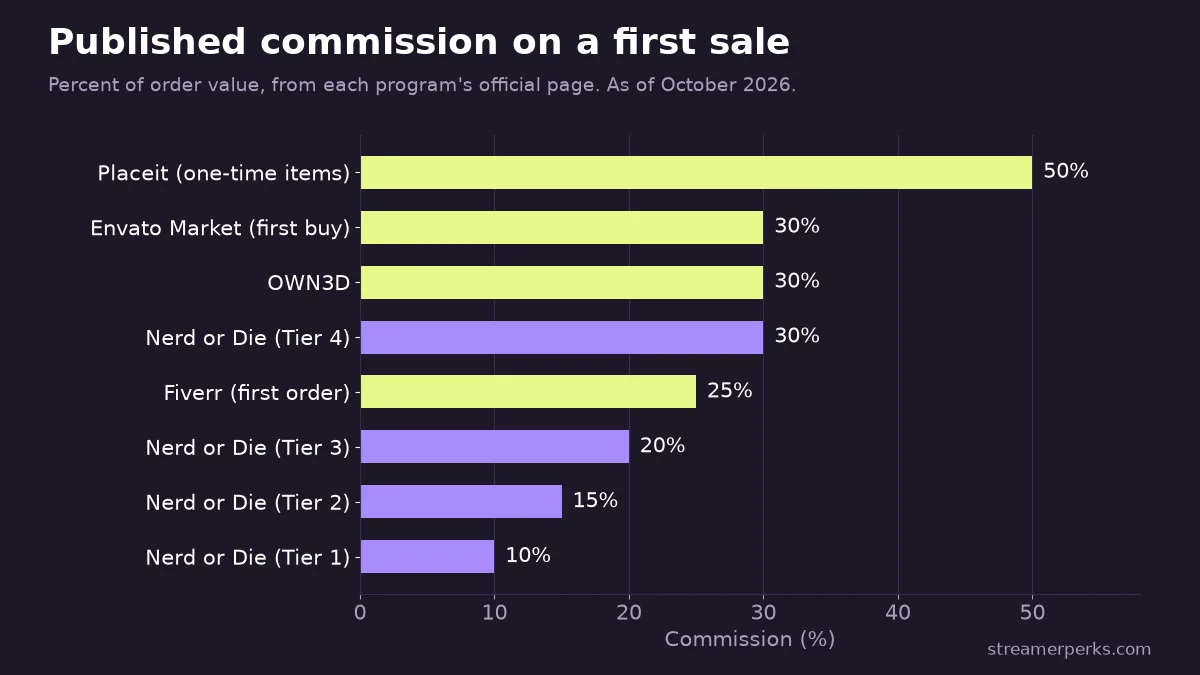
On percentage alone, Placeit's 50% on one-time purchases is the highest published rate, followed by a three-way tie at 30% between OWN3D, Nerd or Die's top tier and Envato Market's first-purchase rate. The headline number misleads in two cases. Nerd or Die only pays 30% at Tier 4, which is invite-only; a new affiliate starts at 10%. Placeit's bigger money is the flat subscription bounty, not the 50%.
| Program | What you promote | Commission | Attribution window | Network / platform | Payout | Entry requirement |
|---|---|---|---|---|---|---|
| OWN3D | Overlays, alerts, emotes, badges, VTuber models | 30% on all products | Not published | FirstPromoter sign-up, paid via Xsolla | €100 minimum | 50+ followers |
| Nerd or Die | Overlays, alerts, widgets, emotes | 10% / 15% / 20% / 30% by tier | Not published | Own affiliate portal, apply on Discord | $10 minimum | None for Tier 1 |
| Placeit | Twitch templates, logos, mockups | $50 annual sub, $20 monthly sub, 50% one-time | 90 days | Impact | Via Impact | Manual review |
| Envato | Envato subscription, Envato Market items | Up to $120 annual / $60 monthly sub; Market 30% first purchase | 90 days | Impact | Via Impact | Manual review |
| Fiverr | Freelance emote and overlay artists | 25% of first order + 10% for 12 months | 30 days | Fiverr's own dashboard | $100 minimum | Open sign-up |
| Etsy Creator Collective | Emote and badge packs from independent sellers | Not published | 7 days (creators) | Rakuten | Direct deposit, PayPal or check | 500+ followers |
How does the OWN3D partner program work?
OWN3D's partner program page lists "30% commission on all products from day one," which means there is no ramp-up tier. The other published terms: you need at least 50 followers, payouts run through the payment company Xsolla, and you can't withdraw until you reach €100.
Sign-up goes through a FirstPromoter portal (own3d.firstpromoter.com). After confirming your email, you create a normal OWN3D shop account and connect your partner URL under My Account, then "Invite & earn." From there you can use OWN3D's ready-made top links or build custom links to specific product pages.
The catalog is wide: overlay packages split by platform (Twitch, Kick, YouTube) and by game, alerts, panels, emotes, sub badges, VTuber and PNGTuber models, plus emote and logo makers. That range lets you link to the exact item a viewer asks about instead of a generic home page.
Two things the page does not state: a cookie or attribution window, and whether subscription products renew commission. If either matters to you, ask OWN3D support before you commit. The €100 threshold also means a small channel can wait months for its first payout.
Is the Nerd or Die affiliate program worth joining?
Nerd or Die runs a four-tier program with a $10 minimum payout, the lowest threshold in this guide. The tiers as published:
- Tier 1 (Entry Level) has no requirements and pays 10%.
- Tier 2 (Experienced) needs 10 referrals and pays 15%.
- Tier 3 (Professional) needs a "revenue target met" (the target isn't published) and pays 20%, plus limited free products.
- Tier 4 (Gold) is by application or invite only and pays 30%, with free products and assisted marketing.
You apply on Discord, not through a web form. Affiliates get a portal that tracks clicks, referrals and commissions, plus marketing media and widgets for live promotion.
The rules are stricter than most. Nerd or Die bans spamming links in chat rooms, offering unofficial discounts, posting your link on coupon sites and using your own link for personal purchases. If you were planning to buy your own overlay through your link, you can't.
The fit is good for small channels because Tier 1 has no follower minimum and $10 is reachable. The catch is the starting rate: at 10%, you earn a third of what OWN3D pays on the same order value until you climb the tiers.
What do Placeit and Envato pay for stream templates?
Placeit sells DIY templates, including Twitch logos, panels and banners. Its affiliate page sends applicants to Impact, and the commission figures are spelled out on Envato's help center, since Placeit is an Envato product: $50 per new annual subscription, $20 per new monthly subscriber and 50% on one-time purchases.
When I checked, the affiliate page showed annual Placeit at $89.69 a year. If that price holds for your referral, a $50 bounty is worth more than half of the buyer's first-year payment. That is the best ratio in this guide.
Envato runs three separate programs on Impact: Envato (the unlimited creative subscription, up to $120 per annual and $60 per monthly subscriber), Envato Market (30% on a first purchase) and Placeit. All three pay only for customers who have never had an Envato subscription, and track referrals for 90 days after the click.
Applications are reviewed by hand. Placeit's help article says that if you don't hear back, you weren't selected. Placeit also forbids bidding on its brand name in paid ads.
Can you earn from Fiverr when viewers buy custom emotes?
Yes. Many streamers commission their first emotes and sub badges from freelancers rather than buying a pack, and Fiverr's affiliate program pays on that. The Marketplace plan pays 25% of a referred buyer's first order, then 10% of every order that buyer places in the next 12 months. A separate Logo Maker plan pays a fixed $30 on the first order plus the same 10% revenue share.
Per Fiverr's help center, the link carries a 30-day cookie. The buyer has to register within 30 days of clicking, and you earn once they make their first purchase. You can claim payment at $100. Commissions pay monthly on net-30 terms, so January's earnings arrive around 1 March.
The 12-month revenue share fits this niche. A streamer who orders emotes often comes back for badges, panels or an animated alert from the same artist, and each of those orders pays you 10%. The commission goes to new buyers only. A viewer who already has a Fiverr account will not earn you the first-order payment.
Does Etsy work for emote and badge packs?
Etsy has a large supply of ready-made emote and badge packs from independent artists, and it runs two programs. The Creator Collective is for social media creators and needs at least 500 followers on one authorized channel. The Affiliates program is for blogs and editorial sites.
Etsy does not publish its commission rate. The help article confirms the attribution windows: 30 days for affiliates, 7 days for creators, and 7 days for any sale made in the Etsy app. Commission is paid on the order price, excluding shipping and VAT. Both programs now run on Rakuten, and payouts wait until Etsy's 7 to 14 day return window closes.
The 7-day creator window is the shortest here. It suits a link you drop during a stream when a viewer asks where your emotes came from. It does not suit evergreen content that people read and act on weeks later. If you run a blog or a resources page, apply to the Affiliates program instead for the 30-day window.
What happened to Visuals by Impulse, StreamSpell and Canva?
These three come up in older lists, and none is a straightforward option today.
- Visuals by Impulse: visualsbyimpulse.com now redirects to the Elgato Marketplace. I found no standalone affiliate page. Elgato's hardware side is covered in our Stream Deck setup guide.
- StreamSpell: its site has no affiliate or partner sign-up link. The footer "Partners" section links to StreamSpell's own Elgato Marketplace store and to Razer and Logitech G. Third-party directories list a StreamSpell program on Impact, but I could not confirm it on an official page, so I've left it out of the table.
- Canva: affiliate benefits now come only through the Canvassador Program, which Canva's help center says is closed to applications.
How long does a click stay credited to you?
The attribution window decides whether a viewer who clicks today and buys next week still counts. Envato and Placeit give the longest at 90 days. Fiverr and Etsy Affiliates give 30. Etsy's Creator Collective gives 7. OWN3D and Nerd or Die don't publish a figure.
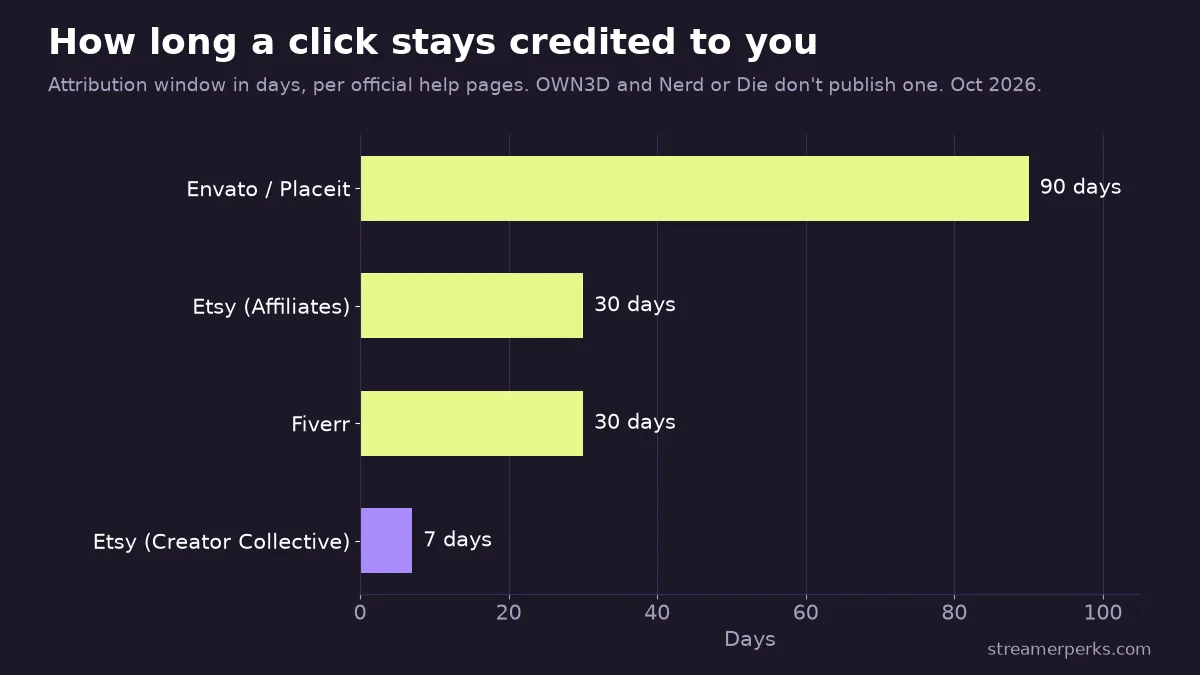
This matters more for design assets than for most products. A streamer often looks at an overlay, leaves, compares two or three shops and buys days later. A long window gives that slow decision time to count. With no published window, assume the shortest plausible one and put the link where people find it at the moment they're ready to buy, such as a "Stream design" panel or a setup tutorial.
For the mechanics of placing links without breaking platform rules, see our guide to affiliate links for streamers.
Which program fits which channel?
- A small Twitch or Kick channel with under 50 followers should start with Nerd or Die. There's no entry requirement and you can withdraw at $10. OWN3D opens up at 50 followers.
- If your channel is growing and viewers already ask about your overlay, OWN3D is the better earner. A flat 30% from day one beats Nerd or Die's first three tiers, and the catalog covers Kick and YouTube as well as Twitch.
- Tutorial and "how I built my stream" YouTube channels suit Placeit and Envato. Flat subscription bounties and a 90-day window reward slower, search-driven buyers.
- VTubers and art-focused streamers get the most from Fiverr, since viewers there tend to commission emotes and models. The 12-month revenue share pays when viewers come back to the same artist. Our VTuber setup guide covers the rest of the stack.
- Short-form creators with 500+ followers can use Etsy Creator Collective for quick, in-the-moment purchases. Our notes on turning short-form video into affiliate sales apply here.
You can join several. None of the program pages I read mention exclusivity, so a setup tutorial can link an OWN3D overlay, a Placeit logo template and a Fiverr emote artist in one video.
How I checked
On 7 October 2026 I read each program's own page: the OWN3D partner program page, Nerd or Die's affiliate page, Placeit's affiliate page and help article, Envato's affiliate help article, Fiverr's affiliate and help pages, Etsy's affiliate help article, StreamSpell's home page and footer, Canva's affiliate help article, and the visualsbyimpulse.com redirect. Every number in this guide comes from those pages. Where a page didn't state a term (OWN3D's and Nerd or Die's attribution windows, Etsy's commission, Nerd or Die's Tier 3 revenue target), the table says so instead of estimating.
FAQ
Do any overlay affiliate programs pay recurring commission?
Fiverr pays 10% on a referred buyer's orders for 12 months. Placeit and Envato pay a one-time bounty per new subscriber. OWN3D and Nerd or Die don't publish anything about recurring commission.
Can I use my own affiliate link to buy my overlay?
Not at Nerd or Die, which bans it outright. Other programs vary, so check the terms before you try.
Do I need to be a Twitch Affiliate to join?
No. None of these programs requires Twitch Affiliate or Partner status. The only follower minimums published are OWN3D's 50 and Etsy Creator Collective's 500.
Related guides
- Amazon Influencer Program for Streamers: How It Works and How to Qualify
- Epic Games Support-A-Creator: How Fortnite Creator Codes Pay
- StreamElements vs Streamlabs: Fees, Ultra Pricing and Which to Choose
- YouTube Shopping Affiliate Program: Eligibility, Commissions and Live Tagging (2026)
- The Comprehensive 2026 VTuber Setup Guide: Best Trackers, Software, and Commissions