StreamElements vs Streamlabs: Fees, Ultra Pricing and Which to Choose
StreamerPerks earns a commission from some outbound links. How programs are checked and how the site is funded.
StreamElements vs Streamlabs: Which One Should You Use?
StreamElements and Streamlabs both give you free alerts, overlays, chatbots and a tipping page, and neither takes a cut of your tips. The real differences are elsewhere: Streamlabs sells a paid Ultra plan and its own desktop app, while StreamElements stays free and makes money through sponsorship campaigns it offers to eligible creators. Pick based on the software you stream with and whether you want sponsor offers.
Quick comparison table
| Feature | StreamElements | Streamlabs |
|---|---|---|
| Core price | Free | Free, with optional Ultra plan |
| Paid tier | None required | Ultra from $15.75/month billed annually ($189/year); Ultra+ above it |
| Cut of tips | None | None |
| Card processor | SE.Pay | Stripe (standard 2.9% + $0.30) |
| PayPal tipping | Yes, PayPal's own fees apply | Yes, PayPal's own fees apply |
| Desktop streaming app | No, works inside OBS via browser sources and the SE.Live plugin | Yes, Streamlabs Desktop (built on OBS) |
| Sponsorships | Yes, invite-based campaigns in the dashboard | Not a core feature |
| Multistreaming | Via your encoder or third-party tools | Included with Ultra |
Prices and fees were checked against the official pages linked below in September 2026. They change, so confirm before you commit.
Is StreamElements or Streamlabs better for alerts and overlays?
For basic alerts, both do the job equally well. You create an overlay in the web dashboard, get a browser source URL and paste it into OBS, Streamlabs Desktop or any encoder that supports browser sources. Follows, subs, bits, raids and tips all trigger alerts on either platform.
The difference is in the theme library. StreamElements gives you its full overlay editor and theme gallery for free, with no paywall on widgets. Streamlabs has a free set of themes and widgets, but its official Ultra page lists "full access to thousands of stream overlays and widget themes including Reactive Overlays" as an Ultra perk. If you want premium Streamlabs themes without paying monthly, you will hit that wall fast.
If you plan to buy or commission custom art anyway, the gap shrinks. Custom PNG/WebM assets work in both editors. For sourcing those assets, see our guide to overlay, alert and emote affiliate programs, which also covers the marketplaces that pay creators for referrals.
How much do StreamElements and Streamlabs charge on tips?
Neither platform takes a percentage of your tips. What you pay is the payment processor's fee.
On Streamlabs, the pricing page and credit card FAQ state that it does not take a fee from tips. Card tips run through Stripe, where the standard processor fee is 2.9% + $0.30 USD. PayPal tips go directly from the viewer to your PayPal account, so PayPal's normal fees apply. Streamlabs also offers optional chargeback protection for card tips, which costs 0.40% per covered transaction whether or not a chargeback happens.
StreamElements is similar. According to its tipping overview, StreamElements does not add its own fee to tips received via PayPal or SE.Pay. Each processor charges its own fees. StreamElements does not publish a flat SE.Pay rate on the overview page, so check the current terms in your dashboard before you switch.
On small tips, the fixed $0.30 portion of a card fee eats a big share. A $2 tip loses roughly 18% to the fixed fee plus percentage. Setting a sensible minimum tip amount helps on either platform.
What is SE.Pay and how does it compare to Stripe on Streamlabs?
SE.Pay is StreamElements' own card processing option. It lets viewers tip with a card instead of PayPal, and funds go through StreamElements' processing before you withdraw them. PayPal usually makes funds available faster, while SE.Pay can involve a processing period before withdrawal.
StreamElements markets SE.Pay as a lower-fee alternative that covers chargeback fees. Streamlabs takes a different route: card tips through Stripe at the standard processor rate, plus paid chargeback protection if you want it.
Chargebacks matter more than most new streamers expect. A viewer tips $100, disputes the charge weeks later, and you lose the money plus a dispute fee. If you get large tips from strangers, the chargeback policy is worth more attention than a fraction of a percent in processing fees.
If you are weighing tip pages beyond these two, our comparison of the best donation platforms for streamers covers Ko-fi, Tipeee and others, with their fee structures side by side.
How much does Streamlabs Ultra cost, and is it worth it?
The official Streamlabs Ultra page lists Ultra as "starting at $15.75/mo", which is the annual rate ($189 per year). Monthly billing costs more; check the checkout page for the current monthly price in your currency. There is also an Ultra+ tier above it.
According to the Ultra page, Ultra includes:
- Multistreaming to several destinations
- Full theme and widget library, including Reactive Overlays
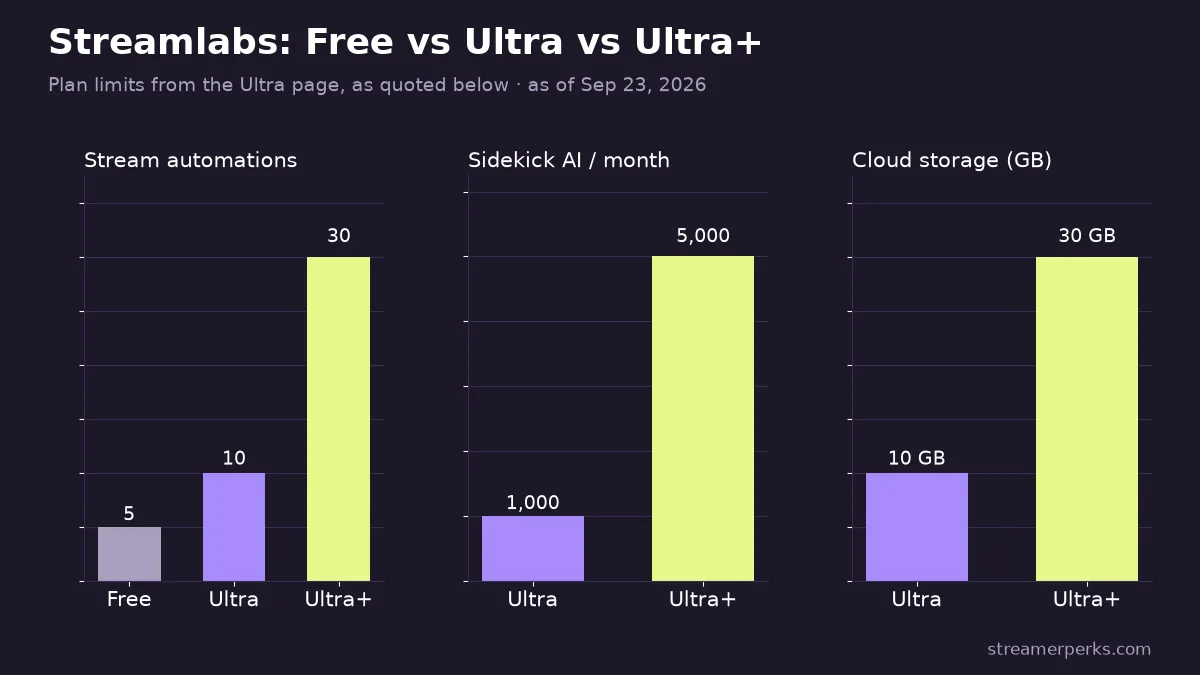
- Up to 10 stream automations (5 on free)
- 1,000 Sidekick AI interactions per month
- 10GB cloud storage
- Collab Cam for up to 11 guests or cameras
- Xbox and mobile streaming access
Ultra+ adds a one-on-one streamer success call, dedicated support, up to 30 automations, 5,000 Sidekick interactions and 30GB storage.
Ultra is worth it mainly if you multistream and want it inside one app, or if you rely on Collab Cam for guests. If you stream only to Twitch with a custom overlay, you are paying for features you won't touch. Before multistreaming, read our breakdown of the Twitch multistreaming policy so you know what Twitch allows.
Does StreamElements have sponsorships?
Yes, and it is the main reason some streamers pick StreamElements. Its sponsorship program connects brands with creators through campaigns shown in the StreamElements dashboard.
How it works, per StreamElements' own documentation:
- Invitations are automated and based on audience size, engagement and content quality. You cannot simply apply for every campaign.
- Gaming campaigns usually pay when viewers download a game or reach in-game milestones. Non-gaming campaigns promote products or services.
- You must complete the mandatory goals of a campaign and drive at least one valid event to qualify for payment.
- Payments are generally processed within 30 to 45 days, depending on campaign terms.
Most sponsorship offers are performance-based, which means income depends on how many viewers act, not on your viewer count alone. Treat it as extra income you can't budget around. For how these deals compare to affiliate links, see affiliate vs sponsorship for streamers.
Streamlabs does not run an equivalent built-in sponsorship marketplace, so if you want inbound sponsor offers without an agent, StreamElements has the edge.
Which works better with OBS?
This comes down to whether you want a separate app.
Streamlabs Desktop is a full streaming app built on OBS. Alerts, chat, themes and widgets are integrated. It is easier for beginners because setup happens in one window. The trade-off: it is its own app, so some OBS plugins and workflows behave differently, and paid features are woven into the interface.
StreamElements does not ship a standalone streaming app. You keep using standard OBS Studio, add overlays as browser sources, and optionally install the SE.Live plugin to get activity feed and chat docks inside OBS. If you already have an OBS setup you like, this keeps it intact.
Both work as plain browser sources in OBS Studio, so you can also mix: use OBS Studio as the encoder and a Streamlabs alert box URL as a source. Our guide to the best streaming software compares OBS Studio, Streamlabs Desktop and others in more depth.
Browser sources also open up interactive segments. The free mini-games on /play, such as tier lists and brackets, run as OBS browser sources alongside either platform's alerts.
Chatbots, loyalty points and merch
Both platforms include a free chatbot with custom commands, timers, moderation filters and giveaways. StreamElements bundles a loyalty points system with a store where viewers spend points on rewards you define. Streamlabs has Cloudbot with its own loyalty points and a similar redemption setup.
On merch, both have offered print-on-demand stores over the years, and the options change. Check each dashboard for what is currently available in your region, and compare margins against dedicated merch platforms before you commit.
Which should you choose?
Choose StreamElements if:
- You already use OBS Studio and don't want to change apps
- You want every overlay feature free
- You want to receive invite-based sponsorship offers
Choose Streamlabs if:
- You are new and want one app that handles everything
- You want built-in multistreaming and are willing to pay for Ultra
- You want Collab Cam for guests without a separate tool
You can also switch later. Tip pages, alerts and overlays can be rebuilt in an evening, and neither platform locks your tip history to a contract.
FAQ
Is StreamElements free?
Yes. StreamElements' overlays, alerts, chatbot and tipping page are free to use. It earns money through sponsorship campaigns and processing partnerships rather than a subscription.
Does Streamlabs take a cut of donations?
No. Streamlabs states it takes no fee from tips. The payment processor (Stripe for cards, PayPal for PayPal) charges its standard fees, and optional chargeback protection costs 0.40% per covered transaction.
Can I use StreamElements and Streamlabs at the same time?
Yes. Both provide browser source URLs, so you can run a StreamElements overlay and a Streamlabs alert box in the same OBS scene. Just avoid duplicate alerts for the same event.
Do I need Streamlabs Ultra to multistream?
Inside Streamlabs Desktop, multistreaming is an Ultra feature. You can also multistream with other tools, but check each platform's rules first.
Can small streamers get StreamElements sponsorships?
Invitations are automated and based on audience size, engagement and content quality, so there is no public minimum. Smaller channels may see fewer offers.
Related guides
- Best Streaming Software Compared (2026): OBS vs StreamElements vs Streamlabs vs XSplit
- Best Donation Platforms for Streamers (2026): Ko-fi vs Streamlabs vs Buy Me a Coffee vs Patreon
- Streaming Tools Affiliate Programs (Checked Oct 2026)
- Overlay, Alert & Emote Affiliate Programs (2026)
- Copyright-Free Music for Streaming: DMCA-Safe Options for Twitch (2026)