YouTube Shopping Affiliate Program: Eligibility, Commissions and Live Tagging (2026)
StreamerPerks earns a commission from some outbound links. How programs are checked and how the site is funded.
YouTube Shopping Affiliate Program: Eligibility, Commissions and How Streamers Use It
The YouTube Shopping affiliate program lets creators in the YouTube Partner Program tag other brands' products in videos, Shorts and live streams, and earn a commission when a viewer buys. Since March 2026 the entry point is 500 subscribers, in 14 countries. Brands set their own commission rates, and earnings are paid through AdSense for YouTube.
Key facts
- Who qualifies: channels in the YouTube Partner Program (YPP) that meet the YPP subscriber threshold and are based in an eligible country.
- Lowest entry point: 500 subscribers, after YouTube opened the program to all YPP creators at that level on March 25, 2026.
- Countries: Argentina, Brazil, India, Indonesia, Japan, Korea, Malaysia, Mexico, the Philippines, Singapore, Taiwan, Thailand, the United States and Vietnam.
- Commission: set per product by the brand or retailer and shown next to each offer.
- Formats: long-form videos, Shorts and live streams.
- Payment: through AdSense for YouTube, within 60 to 120 days after the purchase.
What is the YouTube Shopping affiliate program?
YouTube Shopping has two sides. Merchants connect their product catalogs through Google Merchant Center and opt in to pay creators a commission. Creators browse those products in YouTube Studio, tag the ones they actually feature, and earn when a viewer clicks a tagged product and completes the purchase on the retailer's site.
For viewers the result is a product shelf, a sticker on Shorts, or a pinned product during a live stream. For you, it replaces the "links in the description" routine with product tags YouTube displays inside the player, and it pays through the same AdSense account as your ad revenue.
This is different from selling your own merch on YouTube, which uses a connected store. The affiliate program is for promoting other companies' products. It works alongside your existing affiliate links. You can still put Amazon or brand links in descriptions, as covered in our guide to affiliate links for streamers.
Who is eligible for the YouTube Shopping affiliate program?
Per the official eligibility page, your channel needs to meet all of these:
- Be in the YouTube Partner Program and meet the YPP subscriber threshold.
- Be based in one of the eligible countries.
- Not be a music channel, an Official Artist Channel or associated with music partners.
- Not have its audience set as Made for Kids, and not have a significant number of videos set as made for kids.
The subscriber part depends on which YPP tier you are in. YouTube's expanded YPP overview lists two entry points:
| YPP level | Requirements | Shopping access |
|---|---|---|
| Expanded YPP | 500 subscribers, 3 public uploads in the last 90 days, plus 3,000 qualified watch hours, or 3 million Shorts views in the last 90 days | Yes |
| Full YPP | 1,000 subscribers, plus 4,000 watch hours in 12 months or 10 million Shorts views in 90 days | Yes, plus ad revenue |
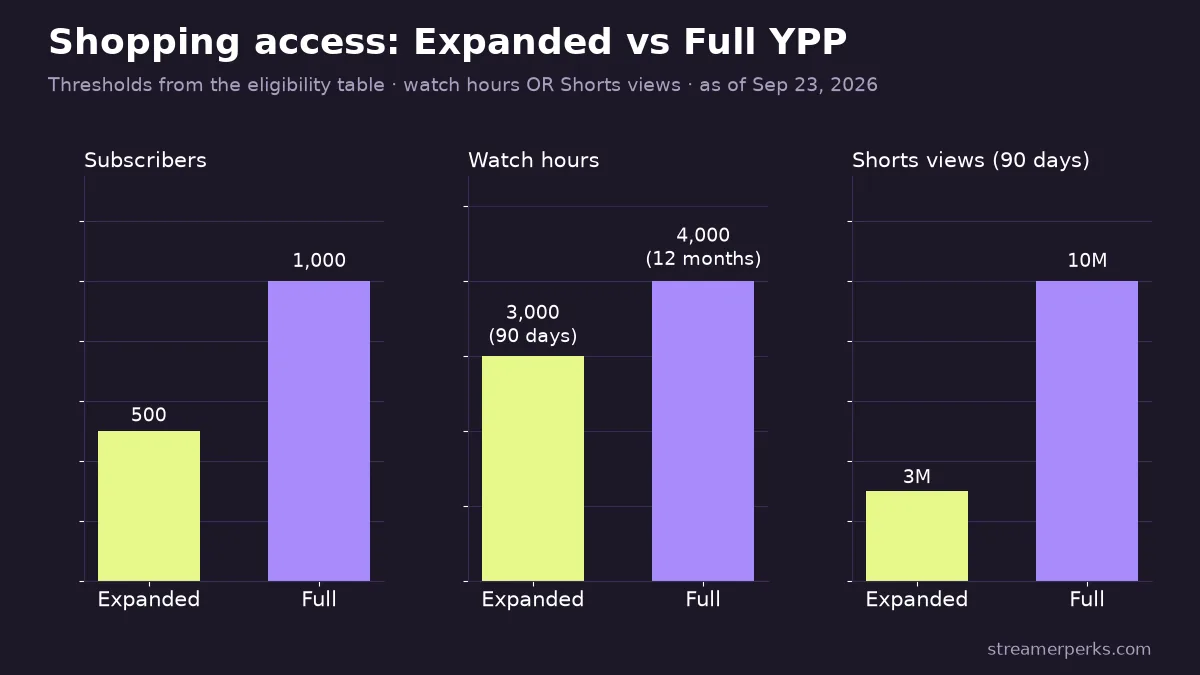
YPP thresholds and availability can differ by country, so check what YouTube Studio shows for your channel. Our YouTube Live monetization guide covers the other features each tier unlocks.
Which countries have the YouTube Shopping affiliate program?
As of September 2026 the program runs in 14 countries: Argentina, Brazil, India, Indonesia, Japan, Korea, Malaysia, Mexico, the Philippines, Singapore, Taiwan, Thailand, the United States and Vietnam. The UK, Canada, Australia and EU countries are not on the list. If you are outside these markets, product tags are not an option yet, and description links through programs like Amazon Associates remain the main affiliate route.
How do you join the YouTube Shopping affiliate program?
If your channel is eligible, the invite appears in YouTube Studio:
- Sign in to YouTube Studio.
- Open Earn in the left menu.
- Find the Shopping affiliate program and click Join now.
- Review and accept the terms.
After joining, the Products section appears in the details of your uploads, and a Shopping tab appears in your live stream setup. If you do not see the option but meet the requirements, check that your channel's country is set to an eligible market and that your channel is not set as Made for Kids.
How much commission does YouTube Shopping pay?
There is no single YouTube Shopping commission rate. Each participating brand or retailer sets its own rate and attribution window, and YouTube shows the commission percentage next to every product offer when you search for items to tag. The affiliate hub in YouTube Studio lists participating sellers and their rates.
Some rules apply to all of them:
- You earn on completed purchases. A viewer has to click your tagged product and buy it on the retailer's site.
- Returns reverse the commission. If the customer returns the product, the commission is taken back.
- The creator share may change. YouTube's help page says that, for now, 100% of commissions from affiliate merchants go to creators, and warns that this may be reduced in the future.
Because rates vary by merchant, compare before you tag. The same headset may be offered by more than one seller at different rates, and brand programs outside YouTube sometimes pay more. Our gaming gear affiliate programs guide lists brands with their own programs.
How do you tag products in YouTube videos and Shorts?
According to the product tagging help page, you can tag up to 60 products.
Long-form videos: in YouTube Studio, open Content, select the video, go to Details, then Products. Search for items, add them, and drag to reorder. On a computer you can also add timestamps so a product appears at the moment you talk about it, for videos of one minute or longer.
Shorts: tagging happens in the YouTube mobile app during upload. Tap the stickers option, choose Products, and add items. The first product in your list becomes the Shopping sticker shown on the Short, so put the main item first.
YouTube's guidelines require products to be meaningfully related to the content. Mention or show every product you tag. A tagged mic that never appears on screen is poor for viewers and against YouTube's shopping policies.
Tags work on older uploads too. A setup tour from last year can earn if you go back and tag the gear in it, which makes the back catalog the fastest place to start. For turning clips into sales, see our guide on short-form video to affiliate sales.
How do you tag products in a YouTube live stream?
Live tagging is the part most relevant to streamers. Per YouTube's live stream tagging guide:
- In YouTube Studio, go to Create, then Go live.
- Choose Stream or Manage from the left menu.
- Open the Shopping tab below the stream preview.
- Click Edit, search for products, click Tag, then Save.
During the stream you can pin a product from the Live Control Room so it stands out for viewers. On desktop you can also turn on auto-rotation, which pins your tagged products one after another, rotating every 60 seconds.
You can add or change tags mid-stream, but YouTube notes that some existing viewers may not see the update. The recommendation is to finish removing and rearranging products at least 30 minutes before you go live. In practice: build your product list during stream prep, the same way you set up your scenes and title.
Because tagging is handled in YouTube Studio, it does not depend on your broadcast software. OBS, Streamlabs or any other encoder sending to YouTube works the same way.
Can you tag Amazon products on YouTube Shopping?
Yes, in the United States. On August 27, 2026, YouTube announced that Amazon had joined the Shopping affiliate program, so eligible US creators can tag Amazon products across Shorts, long-form videos and live streams.
To use it you need to be in the YouTube Shopping affiliate program and to link your channel to an Amazon Associates or Amazon Influencer Program account in good standing. This matters for streamers because Amazon covers most of what sits on a streaming desk. If you have not joined Amazon's creator program yet, our guide to the Amazon Influencer Program for streamers explains eligibility and rates.
How and when are YouTube Shopping commissions paid?
Shopping earnings are paid through AdSense for YouTube, the same account that receives your other YouTube revenue. YouTube pays affiliate commissions within 60 to 120 days after the purchase, which gives merchants time to process returns.
After that, the normal AdSense for YouTube rules apply. For accounts paid in US dollars, the revenue thresholds page sets a $10 threshold to verify identity and address and a $100 payment threshold. Once your balance passes $100 with no holds on the account, payment is issued between the 21st and 26th of the month.
So a headset sold during a September stream typically becomes payable two to four months later, then waits for the next monthly AdSense payment run. Budget for the lag, and track affiliate income separately in your books.
When will tagged products not show?
Tags can silently fail to display. According to YouTube's help pages, products will not show if the content:
- is set as made for kids;
- has a copyright claim;
- has limited or no ad monetization;
- is paid content;
- has been blocked for ads.
For Shorts, using a sound that is not eligible for shopping also blocks tags. Viewers in ineligible regions or on unsupported devices will not see them either. If a stream earns nothing from tags, check claims and monetization status first. Gameplay with licensed music is a common cause, which is one more reason to use copyright-free music.
A simple playbook for gaming streamers
- Tag your real setup on every stream: mic, headset, camera, lighting, chair. Put the item you talk about most at the top.
- Tag your back catalog. Setup tours, reviews and "what I'd change" videos keep earning.
- Cut Shorts from gear questions in chat and tag the product with the Shorts sticker.
- Disclose. YouTube's tips ask you to tell viewers you earn commission, and to tick the paid promotion box if a brand paid you to feature a product.
- Compare rates between YouTube Shopping sellers and direct brand programs before committing to one.
FAQ
How many subscribers do you need for YouTube Shopping affiliate?
You need to be in the YouTube Partner Program and meet its subscriber threshold. Since March 2026 the lowest threshold is 500 subscribers, through the expanded YPP tier where it is available.
How much does YouTube Shopping affiliate pay?
It depends on the product. Each brand sets its own commission rate, shown next to the offer in YouTube Studio. YouTube currently passes 100% of affiliate merchant commissions to creators, but says that may change.
Can I use YouTube Shopping in live streams?
Yes. Tag products in the Shopping tab of your live stream setup in YouTube Studio, pin them from the Live Control Room during the stream, and use auto-rotation on desktop.
Is YouTube Shopping affiliate available in the UK or Canada?
Not as of September 2026. The program runs in 14 countries, listed on YouTube's eligibility page. Check it again periodically, as YouTube has expanded the program several times.
How long does YouTube take to pay Shopping commissions?
Commissions are paid through AdSense for YouTube within 60 to 120 days after the purchase, and only once your balance passes the payment threshold.
Related guides
- YouTube Live Monetization (2026): All Revenue Streams, Requirements, and a Practical Creator Playbook
- How Much Do Streamers Make? Rates for Every Revenue Stream (2026)
- The Ultimate Comparison of Custom Merch Platforms for Streamers in 2026
- Facebook vs YouTube Earnings (2026): Which Pays More, Which Is Easier, and How Creators Should Choose
- Best Affiliate Programs for Streamers in 2026 (Highest Paying + Easiest to Join)