Stream Deck Setup Guide & Best Affiliate Programs for Streamers (2026)
StreamerPerks earns a commission from some outbound links. How programs are checked and how the site is funded.
If you've watched a professional streamer switch scenes, fire sound effects and run chat commands without ever breaking stride, they were probably using a Stream Deck or something like it.
By 2026 the Stream Deck has gone from a nice extra to standard equipment for anyone who streams seriously. This guide covers what a Stream Deck is and why it matters, the best models (Elgato and the alternatives), setup for Twitch, YouTube and Kick, and the affiliate programs that pay on Stream Decks and accessories.
What is a Stream Deck?
A Stream Deck is a customizable control panel with LCD buttons. You can use it to:
- Switch OBS/StreamElements/XSplit scenes with one tap
- Trigger alerts, sound effects and chat commands
- Control lighting, camera angles and audio mixes
- Launch apps, run macros and automate repetitive tasks
It's a physical hotkey panel for your stream, except each button can do far more than a keyboard shortcut.
Why every streamer needs a Stream Deck in 2026
1. Faster workflow
No more alt-tabbing or memorizing 20 keyboard shortcuts. Everything is one button away.
2. Better production value
Smooth scene transitions, instant lower thirds and timed animations make your stream look finished.
3. Less to think about
When you're focused on the game or the conversation, you don't want to remember how to trigger an effect. You press the button and move on.
4. Works with almost everything
It runs with OBS Studio, StreamElements, Streamlabs, XSplit, vMix, and even non-streaming apps like Photoshop and Spotify.
Stream Deck models at a glance
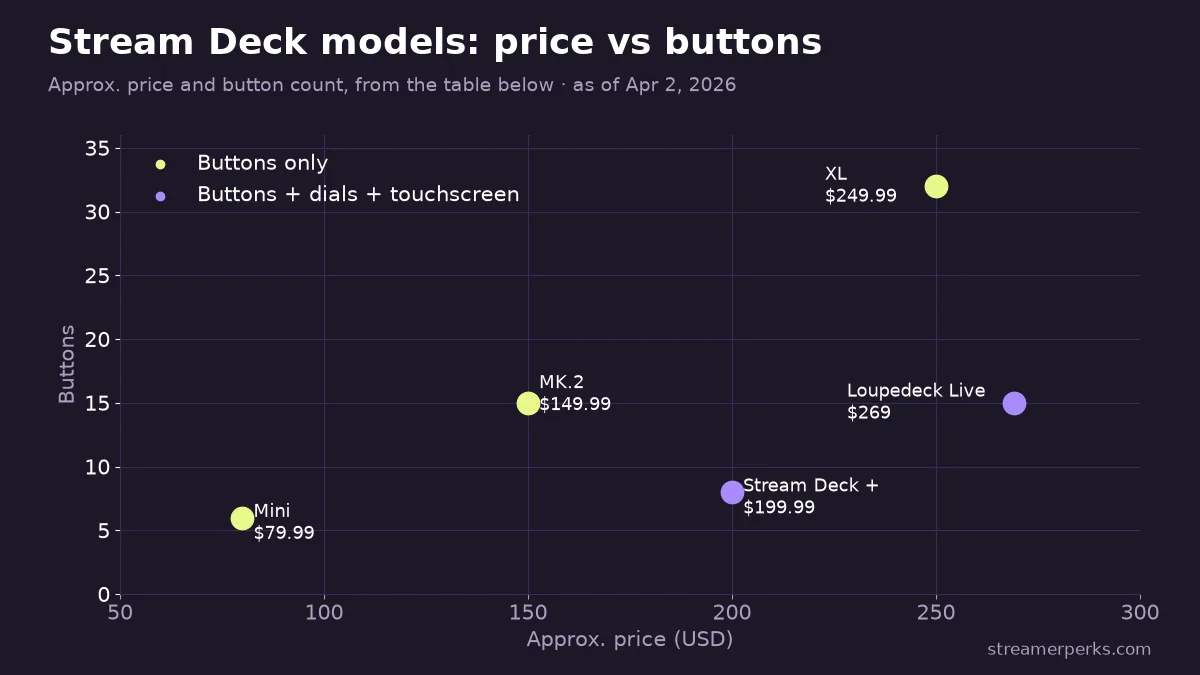
| Model | Buttons | Approx. Price | Standout Feature | Best For |
|---|---|---|---|---|
| Stream Deck MK.2 | 15 LCD | ~$149.99 | Compact, plug-and-play | Solo streamers wanting a reliable setup |
| Stream Deck XL | 32 LCD | ~$249.99 | Double the buttons, less folder navigation | Professional or multi-scene setups |
| Stream Deck Mini | 6 LCD | ~$79.99 | Entry-level price point | Budget-conscious or first-time buyers |
| Stream Deck + | 8 LCD + 4 dials + touchscreen | ~$199.99 | Rotary dials for live audio mixing | Audio engineers, podcasters, IRL streamers |
| Loupedeck Live | 15 buttons + 6 dials + touchscreen | ~$269 | Deep Adobe Creative Cloud integration | Streamers who also edit video |
Best Stream Deck models in 2026
Elgato Stream Deck MK.2 (classic)
The Elgato Stream Deck MK.2 has 15 LCD buttons for ~$149.99. Best for solo streamers who want something compact and reliable.
What you get: plug-and-play support for OBS/Streamlabs/XSplit, free software that's updated constantly, and unlimited profiles and nested folders.
Where to buy: Amazon, B&H Photo.
Elgato Stream Deck XL
The Stream Deck XL has 32 LCD buttons for ~$249.99. Best for professional streamers, podcasters and multi-scene setups.
Why upgrade? Twice the buttons means less digging through folders, which matters for complex productions like talk shows, IRL streams and esports broadcasts.
Elgato Stream Deck Mini
The Stream Deck Mini has 6 LCD buttons for ~$79.99. Best if you're on a budget or just trying the idea out.
Limitations: only 6 keys (so you'll lean on folders a lot) and a smaller screen. It's a fine way in, but most streamers outgrow it within 6 months.
Elgato Stream Deck + (pedal compatible)
The Stream Deck + combines 8 LCD buttons, 4 dials and a touchscreen for ~$199.99. Best for audio engineers, podcasters and IRL streamers.
What sets it apart: rotary dials for volume, brightness or filter adjustments, and a touchscreen for quick shortcuts. It's the one to get if you mix audio live during podcasts or interview streams.
Loupedeck Live
The Loupedeck Live has 15 buttons, 6 dials and a touchscreen for ~$269. Best for streamers who also edit video or use Adobe Creative Cloud.
Why consider it? More physical controls (dials and haptic feedback), deep integration with Adobe apps, OBS and Spotify, and a different look from Elgato's design.
Drawback: smaller community and fewer plugins than Elgato.
Stream Deck setup tutorial (step by step)
Step 1: Download the software
Go to Elgato's downloads page and download the Stream Deck software for Windows or Mac.
Step 2: Connect your Stream Deck
Plug it in over USB. It should be detected automatically.
Step 3: Install the OBS/Streamlabs/XSplit plugin
- Open the Stream Deck software
- Search for your streaming app in the plugin store
- Install the integration (free)
Step 4: Create your first action
- Drag the "Switch Scene" action onto a button
- Select your OBS scene (e.g., "Starting Soon")
- Customize the button icon and label
- Test it live. Your OBS scene should switch instantly.
Step 5: Build out your layout
Buttons most streamers set up:
- Scene switches (Gameplay, BRB, Ending Screen)
- Mute/Unmute (Mic and Desktop Audio)
- Start/Stop Recording
- Trigger alerts (Hype Train, Shoutouts)
- Sound effects (Airhorn, Laugh Track)
- Chat commands (!discord, !socials)
- Timers (Countdown for breaks)
Advanced Stream Deck features
Multi-actions (macros)
Run several commands from one button. For example: switch scene, play a transition sound and send a chat message.
Nested folders
Group buttons by category (Scenes, Audio, Socials, Games) so the layout stays clean.
Third-party plugins
- Spotify Controller: change songs without leaving your game
- Philips Hue Integration: change lighting based on scene
- Discord Mute Toggle: mute Discord and your Twitch mic at the same time
- IFTTT Webhooks: trigger smart home devices or social media posts
Browse plugins at the Elgato Marketplace.
A scene-switch button also works for interactive Browser Source segments, such as a free tier list or bracket overlay you bring up when chat wants to vote.
Which affiliate programs pay on Stream Deck sales?
1. Elgato (via Corsair)
The Corsair Gaming Creator Program covers all Elgato products:
- Commission: 5% on all sales
- Cookie Duration: 30 days
- Payout Threshold: $100
- Products: Stream Decks, Capture Cards, Lighting, Keyboards, Mice
Why promote it? Elgato leads the streaming gear market, and people trust the brand, so it converts better. There's also easy cross-selling: viewers who buy a Stream Deck often pick up a Wave mic or Key Light too.
2. Amazon Associates
The Amazon Associates program covers every Stream Deck model:
- Commission: 3-4% on electronics
- Cookie Duration: 24 hours
- Payout Threshold: $10
Tip: build an Amazon Storefront with your whole stream setup in it.
3. Best Buy Affiliate Program (Rakuten)
The Best Buy Affiliate Program via Rakuten Advertising offers:
- Commission: 1-2%
- Cookie Duration: 7 days
Useful for viewers who'd rather buy from a physical store or wait for a sale.
4. B&H Photo Video Affiliate Program
The B&H Photo Affiliate Program offers:
- Commission: Up to 5%
- Cookie Duration: 14 days
Professionals trust B&H, it doesn't charge sales tax in most states, and its customer service has a good reputation.
How do you promote Stream Deck affiliate links?
- Setup tours, such as "My Full Stream Deck Setup Tour: Every Button Explained." Walk through your layout and show before/after clips.
- Beginner tutorials, such as "How to Set Up a Stream Deck in 10 Minutes (Complete Guide)." These catch new streamers searching for setup help.
- Custom profile downloads. Make pre-built Stream Deck profiles for specific games and host them on Gumroad or your website with affiliate CTAs.
- Comparisons, such as "Stream Deck vs Stream Deck XL: Which Should You Buy?"
- Integration demos, such as "How to Control Spotify with Your Stream Deck."
Alternatives to Stream Deck (budget options)
Touch Portal (mobile app)
Touch Portal turns your phone or tablet into a Stream Deck:
- Price: Free (Pro version $12.99)
- Platform: iOS, Android
- Pros: Cheap, customizable, unlimited buttons
- Cons: No tactile feedback, and the screen can go to sleep mid-stream
LioranBoard
LioranBoard is a free, open-source alternative:
- Price: Free
- Platform: Windows + Android app
- Pros: Open source, very powerful, free
- Cons: Steeper learning curve, smaller community
Should you buy a Stream Deck in 2026?
Yes, if:
- You stream 3+ times per week
- You use multiple scenes, sources or audio channels
- You want your stream to look more professional
- You have $150+ to put into your setup
Wait, if:
- You're brand new to streaming (sort out your mic and lighting first)
- You're on a tight budget (use keyboard hotkeys or Touch Portal instead)
- You stream only from a console (integration is limited)
Final thoughts
A Stream Deck pays for itself in saved time, fewer on-stream mistakes and smoother broadcasts.
Switching scenes mid-speedrun, firing chat commands during a talk show, riding audio levels on a podcast: all of it gets faster and easier with physical buttons.
If you're serious about streaming in 2026, put a Stream Deck near the top of your upgrade list, right after a solid mic and lighting.
Related articles
Related guides
- The Comprehensive 2026 VTuber Setup Guide: Best Trackers, Software, and Commissions
- The Best Audio Mixers and XLR Interfaces for Streamers in 2026
- The Ultimate Comparison of Custom Merch Platforms for Streamers in 2026
- Best Lighting Equipment for Streamers in 2026 (+ Top Affiliate Programs)
- Best Streaming PC Build Guide (2026): 3 Budgets + Affiliate Programs