Affiliate Links for Streamers: A Practical Guide
StreamerPerks earns a commission from some outbound links. How programs are checked and how the site is funded.
Affiliate marketing is one of the more dependable ways a streamer can earn. There's no minimum viewer count, you don't have to pitch brands for approval, and the income grows as your content library does. You recommend something you use, someone buys it, and you get a commission.
This guide walks through choosing what to promote, disclosing it correctly, tracking what converts, and placing links so they don't annoy your audience. It ends with an Amazon Associates setup page as a worked example.
What are affiliate links, and what should you promote?
An affiliate link is a unique URL that tells a retailer "this sale came from Creator X." When a viewer clicks your link and buys within the programme's cookie window, you earn a commission on that sale.
What tends to convert for streamers:
- Gear and peripherals, like microphones, cameras, keyboards and chairs. Viewers ask "what do you use?" all the time, which means they're already researching before they type the question.
- Software and tools: streaming software, VPN services, multistreaming tools. Subscription products can pay recurring commissions month after month.
- Streaming assets such as overlay packs, alert bundles and greenscreen setups. They're cheap enough that people buy on impulse.
Choosing well:
Promote products you actually use. A recommendation based on real use earns more trust, and converts better, than a list of high-commission items you've never touched.
Start with one main pick per category plus one budget alternative. A long unranked list is harder to act on than a direct recommendation, and you can add more once you know what sells.
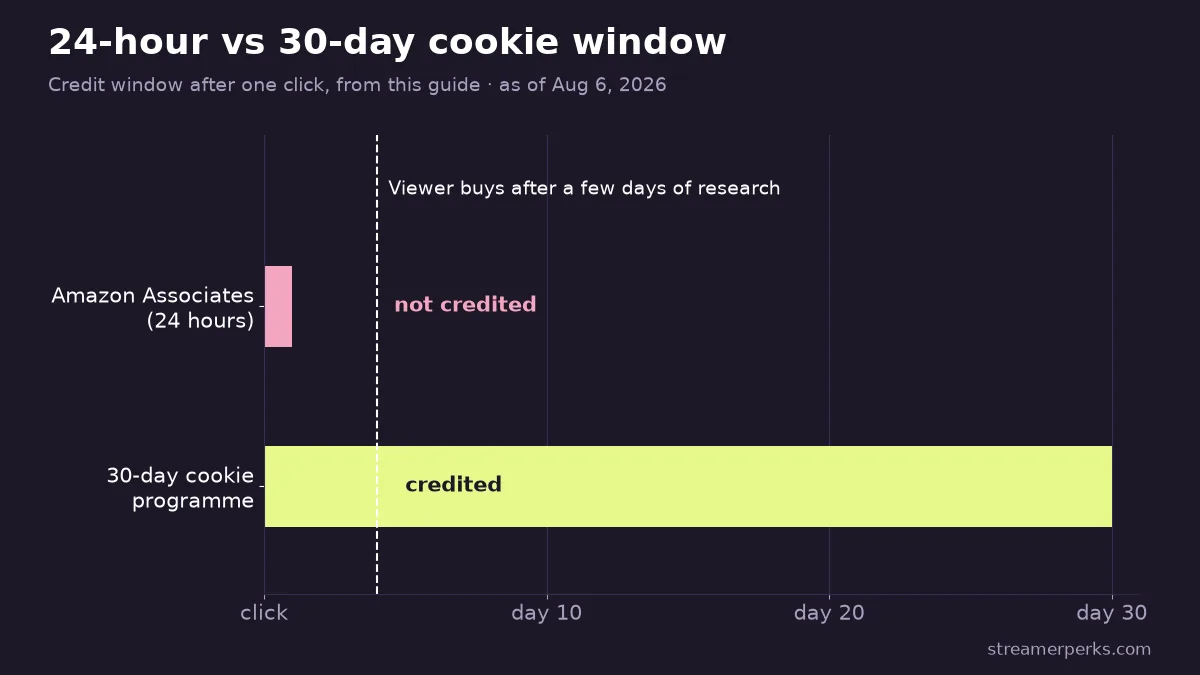
Cookie windows matter. Amazon Associates' 24-hour window works very differently from a 30-day one. Viewers who take a few days to research often won't convert through Amazon unless something reminds them. Use Amazon for high-intent, near-impulse products and longer-cookie programmes for bigger, considered purchases.
How do you disclose affiliate links legally?
If you have an affiliate relationship with a brand, your audience needs to know before they click, not after. The US Federal Trade Commission's endorsement guidance says material connections, affiliate commissions included, must be disclosed clearly and conspicuously, close to where the viewer sees the recommendation. A line in the page footer, text hidden under a "Show more" toggle, or a separate disclaimer page nobody opens does not meet that standard.
> This is general information, not legal advice. Read the FTC's official endorsement guidance directly: FTC Endorsement Guides: What People Are Asking
Disclosure templates you can copy:
Blog post or setup page (near the top, before the first affiliate link):
> "This page contains affiliate links. If you buy through them, I may earn a commission at no extra cost to you."
YouTube description (above the links, not below them):
> "Some links below are affiliate links. I may earn a commission if you purchase, at no extra cost to you."
Twitch or Kick panel:
> "Links in my panels are affiliate links. I may earn a commission if you buy."
Chat command (e.g. `!gear`, `!mic`):
> "Affiliate link (I may earn a commission): [link]"
What to avoid:
- Disclosure only on a separate page that viewers never visit
- Vague wording such as "thanks for supporting" that never mentions the financial relationship
- Putting the disclosure below or after the links it covers
Being upfront rarely hurts conversions. Hidden monetisation wears down trust over time, and lost trust costs you far more than one disclosure sentence.
How do you track which affiliate links convert?
If you aren't tracking by placement, you're guessing. The fix is a consistent naming system and a short weekly review.
Tracking methods compared
| Method | What it tracks | Reliability | When to use |
|---|---|---|---|
| Sub-IDs / tracking IDs | Clicks and sales per placement, inside the affiliate dashboard | High: programme-level attribution | Whenever the programme supports it (most do) |
| UTM parameters | Traffic source and behaviour in your own analytics | Medium: measures clicks to your site, not purchases | Add to all links pointing at your own pages or posts |
| Coupon codes | Purchases tied to your unique creator code, even without a click | Medium: buyers must use the code | Live-stream promotions where viewers buy later from a different device |
A simple naming convention
Consistent sub-ID labels let you filter your affiliate dashboard at a glance:
yt_desc: YouTube video descriptionyt_pin: YouTube pinned commenttwitch_panel: Twitch panel linktwitch_cmd: Twitch chat commandblog_table: comparison table in a postblog_btn: CTA button after a section
Minimal UTM structure
For links that send traffic to your own site or landing pages:
utm_source=youtube&utm_medium=description&utm_campaign=setup_guide&utm_content=mic_pick
Keep it consistent. Mixed-up UTMs make your analytics unreadable.
Weekly 20-minute review
- Clicks by placement
- Conversion rate per placement
- EPC (earnings per click) where your programme reports it
Move your best-performing link into your highest-traffic placement. Small tweaks like this add up fast.
Common tracking mistakes:
- Swapping links so often that you never get a stable baseline to compare against
- Running ten offers at once, so you can't tell which one converts
- Ignoring seasonal swings. A product that sells poorly in August can be your best earner in November
Placing links without hurting retention
Spamming links is the quickest way to lose viewer trust. Dropping one at the moment a viewer is already thinking about buying is the quickest way to earn.
YouTube
- Top 1 or 2 links in the description, since that's where most viewers look first
- Pinned comment that repeats the most important description link
- Verbal CTA in the first 60 seconds when it's directly relevant: *"If you want my exact mic and settings, everything's linked below"*
One clear, relevant call to action per video beats a description stuffed with 15 products. Viewers who feel sold to stop watching. Viewers who feel helped buy.
Twitch and Kick
Panels: 1 or 2 at most. Label them by what the viewer gets, not by category. *"My Audio Setup"* converts better than *"Affiliate Links"* because people scan panels looking for something useful, so tell them what's inside.
Chat commands: trigger one only when it fits the moment:
- A viewer asks what mic you're using mid-stream
- You're showing a piece of gear on screen
- You've just finished a setup tour segment
Commands that fire on a timer no matter what's happening on stream teach viewers to ignore them.
Blog
- A comparison table near the top of the page, for readers who skim straight to comparisons
- CTA buttons after the "why this solves your problem" section, for readers who want the reasoning first
- A short FAQ that answers price and compatibility objections before they come up
Amazon Associates: a worked setup-page example
Amazon Associates is the right place for most streamers to start. Approval is straightforward, the catalogue covers almost anything an audience might ask about, and Amazon's conversion rate is among the highest of any retail affiliate programme.
Build one canonical setup page (e.g. your blog's /gear or /setup) with these sections:
- Audio: microphone, interface or mixer, boom arm
- Video: camera or webcam, key light
- Desk: keyboard, mouse, chair
- Streaming: capture card, control pad
For each item, write a short reason instead of a spec list: *"I switched to this keyboard because the switches are quiet enough that my mic doesn't pick them up."* A line like that tells the reader whether the problem applies to them. If it does, they buy.
Offer two tiers per category: a budget pick and a best-overall pick, and let readers choose. Someone who arrives from "best mic under $50" and finds only your $300 recommendation will leave. Show them a $49 option next to a $149 option and they can pick one and convert.
Supporting posts that funnel in:
Write two or three posts that target specific searches and link back to your setup page:
- "Best microphone for streaming under $100"
- "Streaming setup for under $500"
Each post answers a narrower question, and the setup page is where people land when they want the full picture. That gives you an internal funnel without repeating every affiliate link in every post.
Keep it current. Amazon's inventory changes. Check your setup page every quarter and replace links that return a 404 or "currently unavailable." A broken link on a high-traffic page is money lost.
Official programme link: affiliate-program.amazon.com
Affiliate links earn best when they sit inside content you'd make anyway. You don't need to turn every stream or post into a pitch. Just make it easy for a viewer who already wants what you use to find it and buy it.
Related guides
- Discord Monetization for Streamers: Memberships, Affiliate Links & Sponsor Deals (2026)
- How Streamers Can Turn TikTok / Shorts / Reels Traffic Into Affiliate Sales
- Best Affiliate Programs for Streamers in 2026 (Highest Paying + Easiest to Join)
- Affiliate vs Sponsorship for Streamers: What Pays More (and When)
- Epic Games Support-A-Creator: How Fortnite Creator Codes Pay