Epic Games Support-A-Creator: How Fortnite Creator Codes Pay
StreamerPerks earns a commission from some outbound links. How programs are checked and how the site is funded.
Epic Games Support-A-Creator Program: How Creator Codes Pay Streamers
Epic's Support-A-Creator program gives you a Creator Code that players enter in Fortnite, Rocket League or the Epic Games Store. You earn at least 5% of eligible purchases made while your code is active, paid once you reach $100 in a 12-month window. To apply you need 1,000+ followers on one supported social platform and must accept Epic's creator agreement.
What is the Support-A-Creator program?
Support-A-Creator (often shortened to SAC) is Epic Games' affiliate-style program for content creators. Instead of a tracking link that expires after a click, it uses a Creator Code: a short tag players type into the "Support-A-Creator" field in the Fortnite Item Shop, Rocket League, or the Epic Games Store.
Once a player sets your code, a share of what they spend on eligible items counts toward your rewards. The player pays nothing extra. That makes it one of the easiest asks a gaming streamer can make: "use code X in the Item Shop" costs the viewer nothing and supports you.
Epic describes the program in its Support-A-Creator help center. It is separate from the Fortnite island creator program (payouts for maps you build in UEFN or Creative). SAC pays you for referring spending. Islands are a different program.
If you are building a full income stack, SAC sits alongside the other programs in our best affiliate programs for streamers directory.
Support-A-Creator requirements: who is eligible?
According to Epic's eligibility page, you need:
| Requirement | Detail |
|---|---|
| Followers | 1,000+ on at least one major platform (Epic lists Facebook, Instagram, Twitch, Twitter/X, YouTube and VK, among others) |
| Agreement | Complete the Support-A-Creator affiliate agreement |
| Conduct | Follow Epic's Creator Code of Conduct |
| Age | 13 in eligible countries (14 in South Korea), per Epic's Support-A-Creator 2.0 changes; parent or guardian involvement applies for minors |
| Country | You must live in a country where the program is available |
A few things that trip people up:
- Epic verifies your social account by connecting it during the application. The 1,000-follower check is automated, so the account must be public and yours.
- You only need one platform over 1,000. A Twitch channel with 1,200 followers qualifies even if your YouTube is empty.
- Follower count gets you in; it does not guarantee earnings. A code only pays when viewers actually spend.
If you are still growing toward the threshold, our guides on Twitch Affiliate requirements and how to get verified on Twitch, YouTube and Kick cover the adjacent milestones.
How much do Fortnite creator codes pay?
Epic's rewards article and SAC help pages give these rates:
| Where the player spends | What counts toward your rewards |
|---|---|
| Fortnite | 5% of the value of eligible in-game purchases made with your code set |
| Rocket League | 5% of Credits spent in-game with your code set |
| Epic Games Store games | Set per game by the developer, with a minimum of 5% |
Put simply, if a viewer spends the equivalent of $20 in eligible Fortnite items with your code active, $1 counts toward your balance.
For Fortnite, Epic counts in-game purchases made with V-Bucks, including earned V-Bucks, and most real-money offers. So a player spending V-Bucks from the battle pass still supports you.
On the Epic Games Store, participating developers choose their own rate above the 5% floor, and you can share referral links to store pages as well as your code. Not every store game participates, so check the SAC dashboard before promoting a specific title.
Rates can change. Always read the current terms in your Support-A-Creator dashboard before you quote a percentage to your audience.
How long does a creator code last?
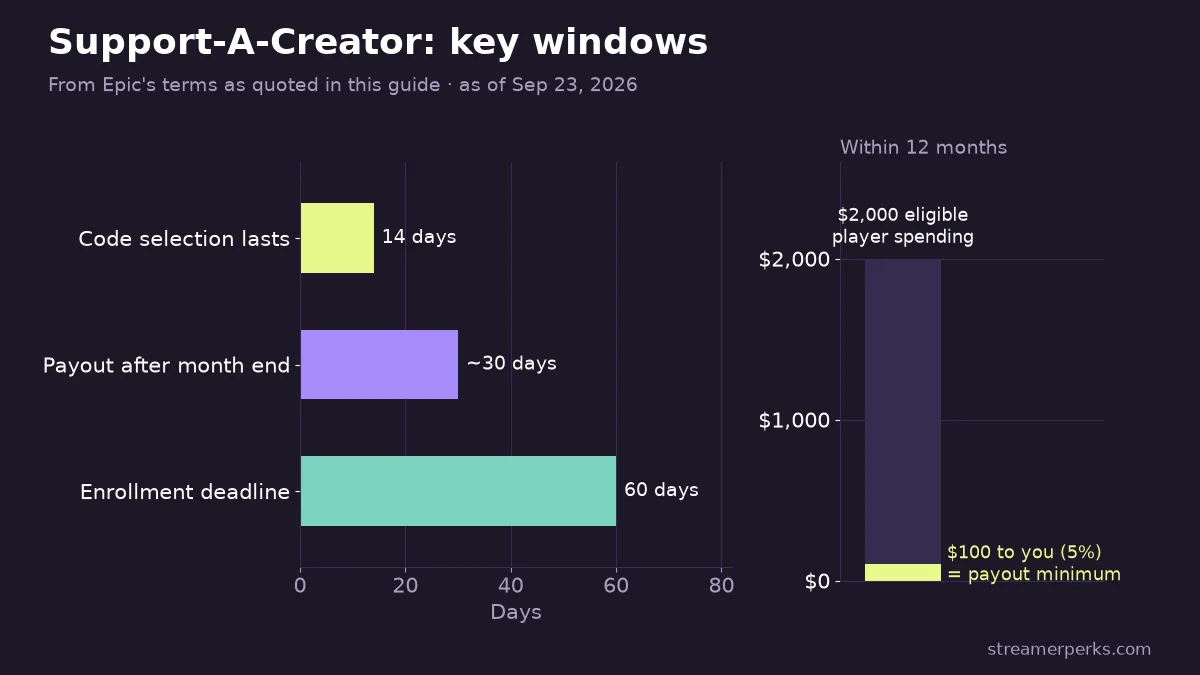
A player's Creator Code selection lasts 14 days. After that it expires, and the player has to enter the same code again (or pick another) to keep supporting a creator.
This detail matters more than the percentage. Most of your earnings come from viewers who set the code right before a big purchase, like a new season's battle pass or a collab skin. Viewers forget to renew, so a code mentioned once a month leaks most of its value.
Practical ways to handle the 14-day window:
- Remind on shop reset days and season launches. That is when spending peaks.
- Put the code in a permanent spot: stream title, panel, chat command (
!code), and video descriptions. - Show where to enter it. A 10-second clip of the Item Shop "Support a Creator" button removes friction for newer players.
- Do not pressure viewers to spend. Epic's code of conduct and platform rules on minors make hard selling a bad idea, and it hurts trust.
Chatbots in StreamElements or Streamlabs can post the code on a timer so you do not have to remember.
How does Support-A-Creator pay out?
Epic does not pay every cent as it comes in. The key rules, from Epic's payment information article and SAC terms:
- $100 minimum: You must reach $100 USD in rewards within a 12-consecutive-month period to receive a payout.
- Timing: Once you reach the minimum, Epic pays approximately 30 days after the end of that month.
- Payout provider: Payments go through a third-party payout provider that Epic engages. You set up a payout account and complete tax and identity enrollment with that provider.
- Enrollment deadline: You have 60 days from acceptance into the program to complete payout enrollment.
- Inactive codes: If you do not earn $100 within a year of getting your code, the code can be disabled. The timer resets each time you reach $100.
Epic has changed payout providers over the years, so older guides naming a specific company may be out of date. Follow the enrollment link in your SAC dashboard rather than a third-party tutorial.
Rewards are income. Keep records of monthly payouts for tax purposes; our streamer bookkeeping guide explains the basics.
How do you apply for a Support-A-Creator code?
The application runs through Epic's Support-A-Creator portal and takes a few minutes if your accounts are ready.
- Sign in with your Epic Games account. Use the account you actually play on.
- Connect a social account with 1,000+ followers. Epic checks the count automatically.
- Choose your Creator Code. Keep it short and identical to your channel name so viewers can type it from memory.
- Accept the agreement and code of conduct.
- Set up payouts and tax details with the payout provider within the 60-day window.
Once approved, your code works across Fortnite, Rocket League and participating Epic Games Store titles. You can check earnings from the SAC dashboard.
If your code gets disabled, the usual causes are inactivity (no $100 in 12 months), a code of conduct violation, or incomplete payout enrollment. Epic's help center has a dedicated article on disabled codes.
Is Support-A-Creator worth it for streamers?
For anyone who streams Fortnite or Rocket League, yes. There is no cost, no exclusivity, and it does not conflict with sponsorships or other affiliate programs. The catch is scale: at 5%, you need your audience to spend $2,000 in eligible purchases within 12 months just to hit the $100 payout.
That favors creators whose viewers already buy skins regularly. A small channel with an engaged, spending community can do better than a larger variety channel that rarely plays Epic titles.
It also fits content you already make. A Fortnite tutorial, a new-season skin review or a shop-reset stream all give a natural moment to mention the code, so the program adds income without adding a new type of content to your schedule.
Compared with other creator income:
| Income source | Who pays | Typical effort |
|---|---|---|
| Support-A-Creator | Epic, from player spending | Low: code reminders |
| Gear affiliate links | Retailer commission | Medium: reviews and setup tours |
| Brand sponsorship | Brand | High: negotiation and deliverables |
Treat SAC as one layer. Pair it with gaming gear affiliate programs and, once you have negotiating power, direct deals (see our affiliate vs sponsorship guide).
FAQ
What percentage do Fortnite creator codes give?
Epic states that 5% of the value of eligible in-game Fortnite purchases made with your code set counts toward your rewards.
How many followers do you need for a Support-A-Creator code?
At least 1,000 followers on one supported social platform, such as Twitch, YouTube, Instagram, Facebook or Twitter/X.
Does using a creator code cost the player extra?
No. The player pays the normal price. The creator's reward comes from Epic's share.
How long does a Fortnite creator code last?
14 days. After that the player needs to enter the code again.
When does Epic pay Support-A-Creator rewards?
After you reach $100 USD within 12 months, Epic pays approximately 30 days after the end of that month, through its third-party payout provider.
Can I use Support-A-Creator for Epic Games Store games?
Yes, for participating games. Each developer sets its own rate, with a minimum of 5%.
Related guides
- Amazon Influencer Program for Streamers: How It Works and How to Qualify
- YouTube Shopping Affiliate Program: Eligibility, Commissions and Live Tagging (2026)
- The Comprehensive 2026 VTuber Setup Guide: Best Trackers, Software, and Commissions
- The Best Audio Mixers and XLR Interfaces for Streamers in 2026
- The Ultimate Comparison of Custom Merch Platforms for Streamers in 2026