Amazon Influencer Program for Streamers: How It Works and How to Qualify
StreamerPerks earns a commission from some outbound links. How programs are checked and how the site is funded.
The Amazon Influencer Program is Amazon's affiliate program for social media creators. It adds a storefront at amazon.com/shop/yourhandle, idea lists, shoppable videos and Amazon Live on top of the link commissions you would earn as an Amazon Associate. You apply with a YouTube, Instagram, TikTok, Facebook or Pinterest account. A Twitch channel on its own does not qualify.
Key facts
- Who can apply: creators with a qualifying YouTube, Instagram, TikTok, Facebook or Pinterest account, according to Amazon's program overview.
- How Amazon judges you: content quality, engagement rate and follower count. There is no published minimum for the Influencer Program itself.
- What you get: a vanity storefront URL, idea lists, shoppable photos and videos, and access to Amazon Live.
- How you earn: standard commissions when your traffic buys, plus lower "onsite" commissions when Amazon shows your content to shoppers already on the site.
- Where it runs: more than 20 countries, including the US, UK, Germany, Canada, India, Brazil, Japan and Australia.
- Payment threshold (US): $10 for direct deposit or gift card, $100 for a check.
What is the Amazon Influencer Program?
Amazon launched the program in 2017 as a version of its affiliate program built around creators rather than websites. The core product is a storefront: a page on Amazon.com that you curate with the products you use and recommend, reachable at a short vanity URL in the format amazon.com/shop/yourhandle.
That short URL is the part streamers tend to underrate. Amazon's own help page describes it as a link you can promote verbally to followers, which is exactly how a live stream works. You cannot read out a long tracking link on stream, but you can say "everything I use is at amazon.com/shop/" followed by your handle, and put it in a chat command.
Inside the storefront you build idea lists (themed product collections), upload photos and videos, and leave short product comments. When a viewer lands on your storefront and buys, you are paid in a similar way to Amazon Associates. When Amazon decides to show your videos or lists elsewhere on its site, you can earn onsite commissions too.
Amazon Influencer Program vs Amazon Associates: what's the difference?
Both programs pay commission on qualifying purchases, use the same rate structure for traffic you send, and are managed in Associates Central. The difference is what you get to publish on Amazon itself.
| Amazon Associates | Amazon Influencer Program | |
|---|---|---|
| Who it's built for | Websites, apps, social pages | Social media creators |
| How you apply | Website, app or social profile | YouTube, Instagram, TikTok, Facebook or Pinterest account |
| Storefront on Amazon | No | Yes, with vanity URL |
| Idea lists, shoppable videos | No | Yes |
| Amazon Live access | No | Yes |
| Onsite commissions | No | Yes |
| Commission on traffic you send | Standard rate table | Similar to Associates |
| Can hold both | Yes | Yes |
Amazon's help pages confirm that existing Associates can join the Influencer Program without starting over, and that you can hold both roles at once. For most streamers the practical answer is to have both: Associates for the tracking links in your panels and video descriptions, the Influencer storefront for the verbal call to action and for onsite earnings.
One Associates rule worth knowing before you apply: Amazon only reviews a new Associates account after it has driven at least three qualifying sales within the first 180 days, per the Associates participation help page. The same page says social pages should be public and established, with "in most cases" at least 500 organic followers.
Who is eligible for the Amazon Influencer Program?
Amazon does not publish a follower minimum for the Influencer Program. The application asks you to sign in with a social account, and Amazon evaluates it on three signals it names publicly: content quality, engagement rate and follower count. If you are declined, Amazon says you can reapply later.
What that means in practice:
- Apply with your strongest non-Twitch account. If your YouTube channel has VODs, highlights and a real comment section, that is a better application than a TikTok with a few viral clips and nothing else.
- Make sure the account is public. The Associates rules reject pages where posts or follower counts are hidden, and the same logic applies here.
- Show that you talk about products. Setup tours, gear reviews and "what's on my desk" videos give Amazon evidence that your audience will shop from you.
- Engagement matters as much as size. A smaller channel with active comments can look better than a large one with little response.
The program is available in the US, UK, France, Germany, Italy, Spain, Canada, India, Brazil, Poland, Sweden, the Netherlands, Japan, Australia, Singapore, Belgium, Mexico, the UAE, Saudi Arabia, Egypt and Türkiye. Each marketplace has its own storefront and its own commission rates.
Can Twitch streamers join the Amazon Influencer Program?
Not with a Twitch account alone. Amazon's list of qualifying platforms is YouTube, Instagram, TikTok, Facebook and Pinterest. The workaround is simple: most streamers already post clips somewhere, so apply with that channel and then promote the storefront on Twitch. Nothing in the program restricts where you share your storefront URL once you are accepted, as long as you follow the Associates rules on disclosure and on not promoting links offline or in unsolicited messages.
If you stream on Kick or Twitch and have no clip channel yet, starting one is worth it for reasons beyond Amazon. Our guide to turning short-form video into affiliate sales covers the workflow.
How much do Amazon influencers earn per sale?
Amazon pays a percentage of the item price, set by product category. There are two separate tables, and the difference between them is large.
Standard rates apply when your link or storefront sends the buyer to Amazon. Onsite rates apply when Amazon shows your content (a video on a product page, an idea list, a livestream) to someone already shopping, and they buy after clicking it.
Selected US categories relevant to streaming setups:
| Category | Standard rate | Onsite rate |
|---|---|---|
| Headphones | 3.00% | 1.00% |
| Musical Instruments | 3.00% | 2.00% |
| Furniture, Home, Home Improvement | 3.00% | 3.00% |
| PC Components | 2.50% | 0.50% |
| Televisions | 2.00% | 0.50% |
| Physical Video Games and Consoles | 1.00% | 0.50% |
| All other categories | 4.00% | 1.00% |
| Gift Cards | 0.00% | 0.00% |
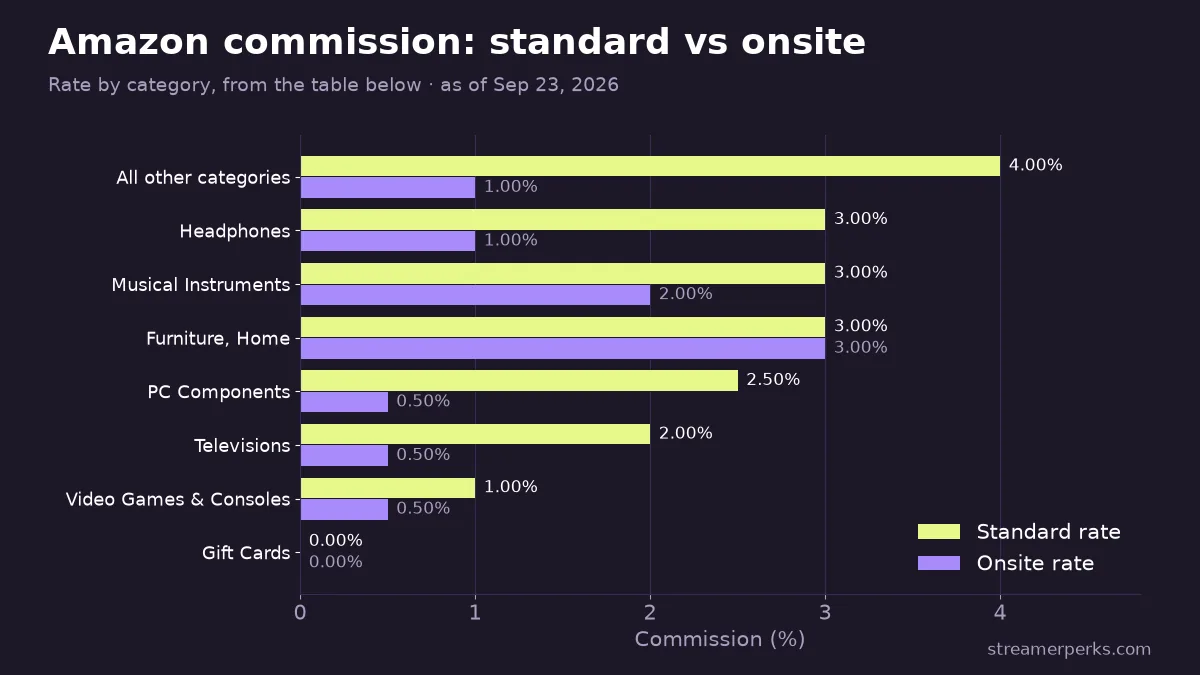
Source: Amazon's standard commission income statement and onsite commission income statement. Check both before you plan content: Amazon revises these tables, and other marketplaces use different numbers.
Two things stand out for gaming creators. Consoles and games pay poorly in both tables, so a setup video earns more from the mic arm, lighting and desk accessories than from the console on the desk. Onsite commissions are a bonus on top: the rates are lower, and you do not control where Amazon places your content.
Amazon also lists other earning paths for influencers, including bounties for sign-ups to services such as Prime and Audible, Creator Connections campaigns with brands, and monthly Creator Rewards bonuses. Terms for these change often, so check Associates Central rather than planning around them.
What are onsite commissions?
Onsite commissions pay you when your published content earns a sale from a shopper who was already browsing Amazon. You did not send that person, but your video or idea list influenced the purchase, so Amazon pays the lower onsite rate.
According to Amazon's onsite commissions help page, Influencer Program members are automatically assigned a separate Onsite Store ID. You need to complete tax and payment information on that ID in Associates Central, or those earnings will not be paid out. This step is easy to miss because your main account may already be set up.
Content must be published in a given country's marketplace to earn onsite there. For videos, Amazon counts a purchase after the viewer has watched for a minimum period, and all products in a video should be tagged so it can be considered for product-page placement.
How does Amazon Live work for streamers?
Amazon Live is Amazon's shoppable livestream format. Only Influencer Program members can go live, using the Amazon Live Creator app. During a stream you chat with viewers, highlight products in a carousel below the video and share promo codes or deals.
The part that matters for streamers: you are not limited to a phone camera. Amazon's guide to streaming with OBS explains that you get an RTMP server URL and stream key from the Amazon Live Creator app and paste them into OBS Studio, the same way you would for any custom RTMP destination. Your existing scene setup, camera and audio chain carry over.
Amazon Live is a different audience from Twitch. Viewers are there to shop, not to watch gameplay, and Amazon's creator guidance favors live, shopping-focused content with active interaction and longer sessions. A realistic use for a gaming streamer is an occasional dedicated gear stream: "my full setup, what I'd buy again, what I wouldn't," with every item in the carousel. Earnings from livestreams appear in the Amazon Live Creator app and in Associates Central.
How to use the program on Twitch, YouTube and Kick
Once accepted, set up the storefront before you promote it. An empty storefront converts badly.
- Build idea lists that match what viewers ask about. "Full stream setup," "budget starter setup," "audio chain," "lighting." Put the exact products from your stream in them.
- Add one line of honest comment per product. Why you picked it, and who it is not for.
- Create a chat command.
!setupor!gearreturning your storefront URL and a short disclosure. - Add a Twitch panel that links to the storefront, next to your other affiliate links.
- Say it on stream when it's relevant. When someone asks about your mic, the vanity URL is easier than pasting links.
- Put tracking links in YouTube descriptions for VODs and setup videos, since those keep earning long after the stream.
If you stream on YouTube, you can also link your Amazon account to YouTube Shopping and tag Amazon products directly in videos, Shorts and live streams. We cover that in the YouTube Shopping affiliate program guide.
Amazon rarely pays the best rate for any single category. For gear you recommend often, compare Amazon against brand programs listed in our gaming gear affiliate programs guide, and use Amazon for the long tail of items that have no program of their own.
When and how does Amazon pay?
Amazon pays monthly by direct deposit, gift card or check. Per Amazon's payment help page, balances under $10 roll over for direct deposit and gift card, and the check minimum is $100. Payment runs about two months behind: Amazon's own example shows January earnings being paid in March.
A standard Amazon referral session lasts 24 hours from the click, or until the viewer places an order, per the Associates Operating Agreement. If the viewer adds an item to their cart during that window, the purchase can still count later, within Amazon's 89-day limit. Late-night streams where viewers buy the next morning still count, but a viewer who remembers your recommendation a week later and searches Amazon directly does not.
Treat this as business income. If affiliate revenue is becoming meaningful, our guide to taxes and bookkeeping for streamers covers record-keeping.
Common mistakes
- Skipping the Onsite Store ID setup: Onsite earnings sit unpaid until tax and payment details are added to that ID.
- Promoting consoles and games: Low rates in both tables. Promote the accessories.
- Posting links in unsolicited DMs: Amazon only allows links in emails, SMS and direct messages that the recipient opted into.
- Hiding the disclosure: Amazon requires compliance with the FTC endorsement guides. Put a clear note in your chat command and panel.
- Leaving a stale storefront: Out-of-stock items and gear you no longer use cost you trust with regulars.
FAQ
Is the Amazon Influencer Program free to join?
Yes. There is no fee to apply or to keep a storefront. You apply on the Amazon Influencer sign-up page in Associates Central by signing in with a qualifying social account.
How many followers do you need for the Amazon Influencer Program?
Amazon does not publish a minimum for the Influencer Program. It reviews content quality, engagement rate and follower count together. For Amazon Associates social applications, the help page says "in most cases" at least 500 organic followers.
Do Amazon influencers make more than Associates?
Not per sale. Traffic you send earns the standard rate in both programs. Influencers can add onsite commissions and Amazon Live earnings on top, but onsite rates are lower than standard ones.
Can I use my Amazon storefront link on Twitch?
Yes. Apply with a YouTube, Instagram, TikTok, Facebook or Pinterest account, then share the storefront anywhere you are allowed to post links, including Twitch panels and chat commands. Follow Amazon's disclosure rules and Twitch's own guidelines.
Is Amazon the best affiliate program for streamers?
It is the easiest to start with, because it covers almost everything on your desk. It is rarely the highest-paying. See our list of the best affiliate programs for streamers for programs that pay more in specific categories.
Related guides
- Epic Games Support-A-Creator: How Fortnite Creator Codes Pay
- YouTube Shopping Affiliate Program: Eligibility, Commissions and Live Tagging (2026)
- The Comprehensive 2026 VTuber Setup Guide: Best Trackers, Software, and Commissions
- The Best Audio Mixers and XLR Interfaces for Streamers in 2026
- The Ultimate Comparison of Custom Merch Platforms for Streamers in 2026