How to Get Verified on Twitch, YouTube & Kick (2026): Requirements & Strategies
StreamerPerks earns a commission from some outbound links. How programs are checked and how the site is funded.
The little checkmark next to your name does more than look nice. It tells people the account is really you, it makes brands and viewers take you more seriously, and it makes impersonating you harder.
You don't get it automatically, though. Every platform has its own rules, some requirements nobody publishes, and approval processes that keep changing.
Verification on streaming platforms looks different in 2026. Some platforms only verify by invitation, some tie it to follower counts, and a few are trying out paid verification.
This guide covers what verification does and doesn't do, the exact requirements for Twitch, YouTube, and Kick, how to improve your odds of approval, and what to do if you're denied.
What does verification actually mean?
The benefits
- It proves you're the real account, not a fan page or an impersonator.
- Viewers, brands, and collaborators take you more seriously.
- Verified accounts often rank higher in platform search results.
- Some platforms give verified creators tools nobody else gets.
- Scammers have a harder time pretending to be you.
What verification does NOT do
- Doesn't guarantee more views or growth
- Doesn't affect algorithm recommendations (usually)
- Doesn't change your monetization rate
- Doesn't grant immunity from bans or strikes
Bottom line: verification helps your credibility. It won't grow your channel.
Twitch Partner badge (the "checkmark")
What it is
Twitch has no traditional verification checkmark like YouTube or Instagram. The Partner badge (purple checkmark) does the same job: it tells people you're an established creator Twitch has vetted.
Note: the Affiliate badge (purple icon without checkmark) is easier to get but doesn't carry the same weight.
Twitch Partner requirements (2026)
| Metric | Minimum Requirement |
|---|---|
| Stream Frequency | 25 hours in the last 30 days |
| Stream Days | 12 unique days in the last 30 days |
| Average Viewers | 75 concurrent viewers (30-day average) |
| Followers | No strict minimum (but 1,000+ helps) |
Twitch also looks at content quality (production value, consistency), community engagement (chat activity, Discord, social media), compliance (no recent bans or warnings), and variety (streaming different games or categories).
How to apply for Twitch Partner
- Meet the basic requirements (see table above)
- Go to your Twitch Dashboard
- Click Preferences → Channel & Videos → Partner
- Click "Apply for Partnership"
- Fill out the application form: why you want to be a Partner, how you promote your channel, and what makes your content different
- Wait 2 to 4 weeks for review
Approval rate: ~30-40%. Twitch is picky.
How to increase your chances
- Hold 75+ average viewers consistently. Don't pad the number with viewbots, because Twitch detects them.
- Stream on a schedule. Consistency matters more than total hours.
- Build a community: active chat, a Discord server, a Twitter presence.
- Mix up your content instead of playing only one game.
- Get the production right: good audio, lighting, overlays, clean transitions.
- Keep applying. Many Partners were rejected 2-3 times before they got in.
What if you get denied?
Twitch sends an email explaining why. The usual reasons:
- Average viewership too low (hitting 75 for a few days doesn't count; the 30-day average does)
- Recent community guideline strikes
- Low engagement (lots of viewers with a dead chat looks suspicious)
- An irregular streaming schedule
What to do: wait 30 days, fix what the feedback points to, and reapply.
YouTube verification (channel verification badge)
What it is
YouTube's gray checkmark means your channel is verified as authentic. It has nothing to do with the YouTube Partner Program (monetization).
Note: YouTube also has Official Artist Channels for musicians, which use a different badge.
YouTube verification requirements (2026)
| Metric | Requirement |
|---|---|
| Subscribers | 100,000+ |
| Application | Automatic once you hit 100K subs |
| Account Status | No strikes, compliant with guidelines |
That's all. Once you pass 100K subscribers, the badge shows up on its own, usually within 7 days.
How YouTube verification works
- You don't apply manually (unlike Twitch).
- YouTube's system reviews your channel automatically once you cross 100K.
- The badge appears next to your name on videos, comments, and search results.
What if you don't get the badge after hitting 100K?
YouTube may hold back verification because of:
- Recent community guideline strikes
- Impersonation concerns (your channel name or branding looks like another creator's)
- Spammy or misleading content
What to do: go to YouTube Support, submit a verification request, and wait 2 to 4 weeks for a manual review.
How to grow to 100K faster
- Post consistently, at least 1 video per week.
- Work on titles, thumbnails, and descriptions. CTR decides a lot.
- Hook viewers in the first 30 seconds, since the algorithm rewards retention.
- Cut streams into short-form content. YouTube Shorts can grow a channel very fast.
- Collaborate with other creators so you promote each other.
Kick verification (creator badge)
What it is
Kick marks verified accounts with a blue checkmark, but you get it by invitation or application, and the criteria are still changing.
Kick verification requirements (2026)
| Metric | Estimated Requirement |
|---|---|
| Followers | 10,000+ (unofficial threshold) |
| Streaming Activity | Regular streaming (3+ times/week) |
| Partnership Status | Kick Partner or Creator Program |
| Application | Manual request or invitation |
Be aware that Kick is inconsistent here. Some creators with 5K followers are verified, and some with 50K aren't.
How to request Kick verification
In 2026 there's still no self-service application for Kick verification. Your options:
- Join the Kick Creator Program if you're eligible. Apply on the Kick Creator Program page.
- Contact Kick Support by email at [email protected] or through the Kick Official Discord.
- Wait to be contacted. Kick often reaches out to growing creators on its own.
How to increase your chances
- Stream on a consistent schedule, because Kick favors active streamers.
- Bring your audience over from Twitch or YouTube. Kick wants established creators.
- Keep your engagement numbers up: viewers, chat activity, subs.
- Make content that stands out, since Kick wants to look different from Twitch.
Tip: if you're a Twitch Partner or YouTube Partner thinking about multistreaming or moving to Kick, say so when you reach out. Kick actively recruits talent.
X (Twitter) verification (blue checkmark)
What it is
Twitter (now X) has two kinds of verification:
- Blue checkmark (paid): $8/month for individuals, $12/month for organizations
- Legacy verification (pre-2023): rare and no longer granted
In 2026 the blue checkmark comes with a subscription. It has nothing to do with merit.
How to get verified on X
- Go to x.com/i/verified-choose
- Subscribe to X Premium ($8/month)
- Meet the basic requirements: account older than 90 days, active phone number, no recent policy violations
Approval time: instant, as long as you pay.
Should streamers get X verification?
Pros: some credibility (it still signals an official account), more visibility in replies and threads, the ability to edit tweets, longer posts, and higher video upload quality.
Cons: $96/year ($8/month), less prestige than legacy verification, and it won't do much for your stream viewership.
Verdict: only worth it if you actively use X for networking, brand deals, or community building.
Instagram verification (Meta Verified)
What it is
Instagram's blue checkmark verifies your identity. In 2023 Meta added Meta Verified, a paid verification for Instagram and Facebook.
Instagram verification options (2026)
Option 1: Traditional verification (free)
Requirements: a notable presence (recognized public figure, brand, or entity), authenticity (a real person or business, not a parody), uniqueness (one account per person or brand), a complete profile (photo, bio, at least one post), and a public account.
How to apply: Settings → Account → Request Verification. Provide a government ID plus supporting documents (press mentions, Wikipedia, etc.). Wait 2 to 4 weeks.
Approval rate: <5%. Very few get through.
Option 2: Meta Verified (paid)
Requirements: age 18+, a government ID matching your account name, and two-factor authentication turned on.
Price: $11.99/month (web) or $14.99/month (iOS/Android).
How to subscribe: Settings → Meta Verified → Subscribe and upload ID.
Approval time: 24-48 hours.
Is Meta Verified worth paying for? You get a blue checkmark on Instagram and Facebook, proactive account protection, and access to human customer support. It costs $12-$15/month and doesn't do much for reach. It's only worth it if you're building a personal brand or selling products through Instagram.
TikTok verification (rare and invitation-only)
TikTok's blue checkmark is very exclusive, and you can't apply for it publicly.
Unofficial thresholds, based on what creators report:
- Followers: 500K to 1M+
- Engagement: high video views, shares, and completion rates
- Authenticity: a real risk of impersonation
- Brand partnerships: official partnerships or media presence
How to get verified: there's no public application form. TikTok contacts eligible creators itself. You can message TikTok Creator Support, but they rarely reply.
Discord server verification (Partner badge)
Discord gives a Partnered Server badge (blue checkmark next to the server name) to communities that meet specific criteria.
Discord Partner requirements (2026)
| Metric | Requirement |
|---|---|
| Members | 500+ (at least 50% active) |
| Server Age | 8+ weeks old |
| Engagement | Consistent activity (messages, voice) |
| Compliance | No ToS violations |
How to apply: go to discord.com/partners, fill out the Partner Application, and wait 2 to 4 weeks for review.
Approval rate: ~10-20%. Selective, but reachable.
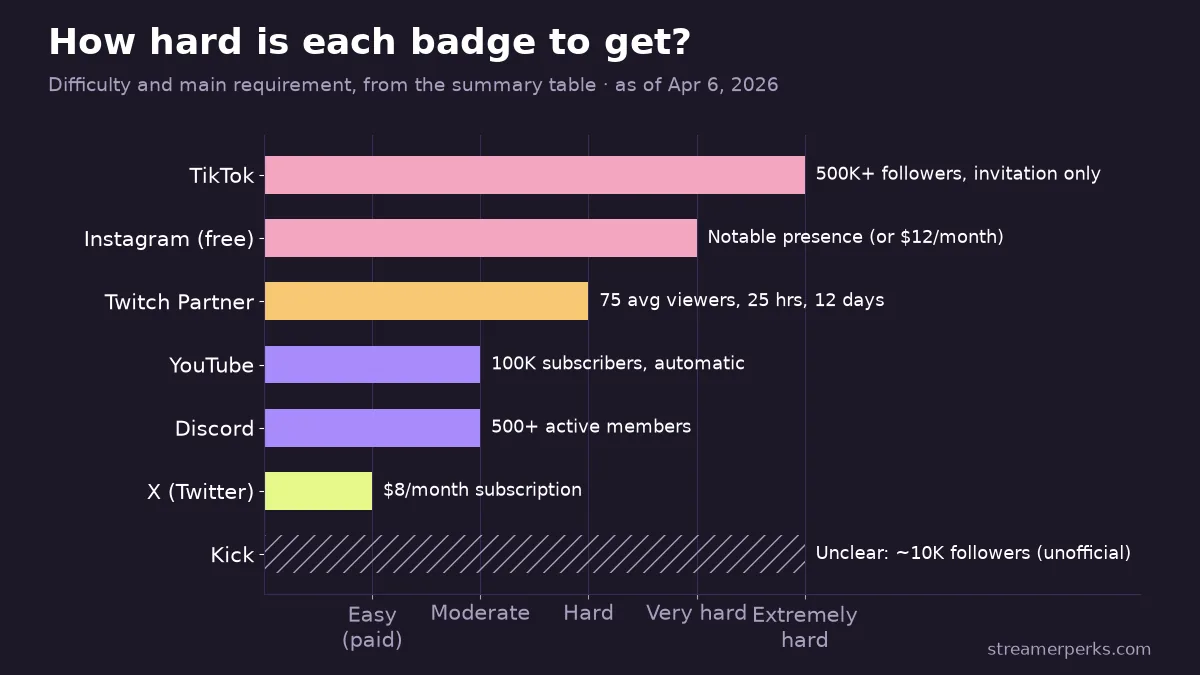
What are the verification requirements on each platform?
| Platform | Requirement | Application Type | Difficulty |
|---|---|---|---|
| Twitch Partner | 75 avg viewers, 25 hrs, 12 days | Manual application | Hard |
| YouTube | 100K subscribers | Automatic | Moderate |
| Kick | ~10K followers (unofficial) | Invitation/request | Unclear |
| X (Twitter) | $8/month subscription | Paid subscription | Easy (paid) |
| Notable presence OR $12/month | Manual or paid | Very hard (free) | |
| TikTok | 500K+ followers (invitation-only) | Invitation only | Extremely hard |
| Discord | 500+ active members | Manual application | Moderate |
Should you pursue verification?
YES, if:
- You consistently hit the thresholds (applying too early is pointless)
- You're dealing with impersonators or scammers
- You're pitching brand deals or partnerships, where the badge adds credibility
NO, if:
- Growth is all you care about right now (verification doesn't help with that directly)
- You don't meet the basic requirements yet
- You'd be paying for verification on platforms you barely use
Final thoughts
Verification won't fix a channel. It's a credibility signal, and it matters most once you already have an audience.
Don't fixate on the checkmark early. Do this instead:
- Keep your content consistent (schedule, quality, engagement)
- Build a real community, not just a number
- Reach the platform thresholds on your own merit
- Apply or request verification once you're eligible
The streamers who worry most about badges are often the furthest from needing one. The ones who've earned it tend to be too busy making content to think about it much.
Put your effort into the content, and the badge will follow once your numbers get there.
Related articles
Related guides
- Where to Stream in 2026? Twitch vs YouTube vs Kick vs Facebook Gaming
- How Much Do Streamers Make? Rates for Every Revenue Stream (2026)
- YouTube Live Monetization (2026): All Revenue Streams, Requirements, and a Practical Creator Playbook
- Facebook vs YouTube Earnings (2026): Which Pays More, Which Is Easier, and How Creators Should Choose
- Kick Monetization Explained (2026): How Streamers Make Money, What to Expect, and How to Build Stable Income