Streamer Taxes 2026: LLC, Write-Offs and IRS Forms
StreamerPerks earns a commission from some outbound links. How programs are checked and how the site is funded.
Streamer taxes in 2026: LLCs, write-offs, forms and deadlines
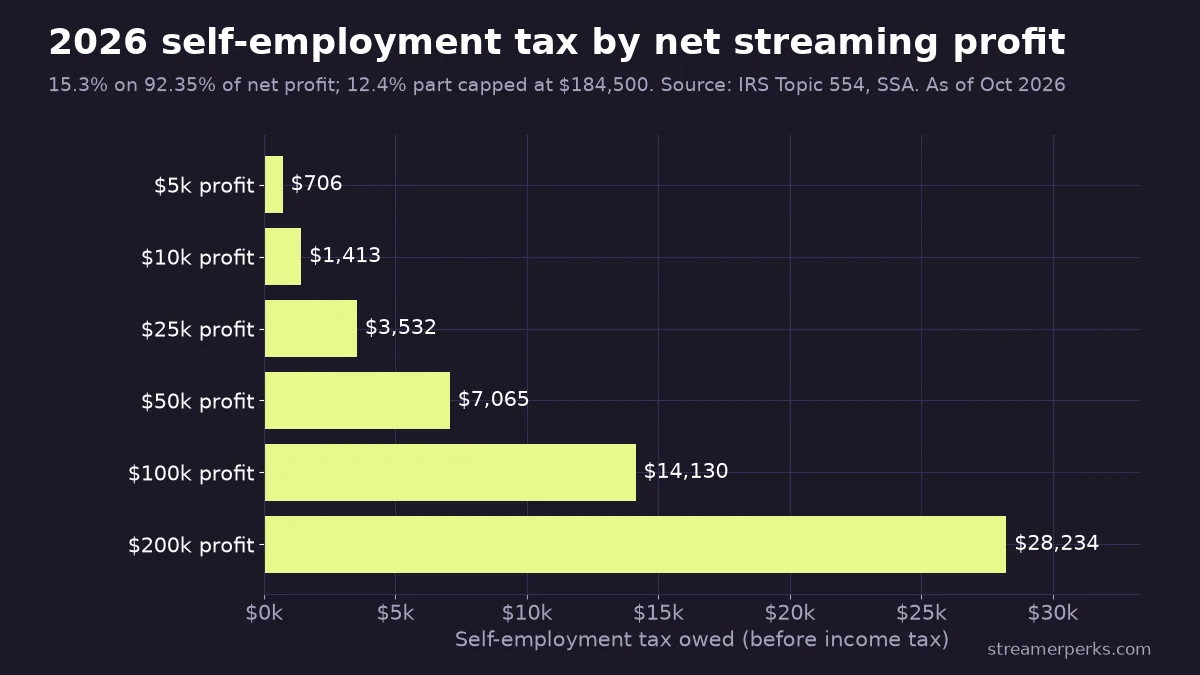
If you're a US streamer, every dollar from Twitch, YouTube, Kick, sponsors and affiliate links counts as self-employment income. For 2026 that means 15.3% self-employment tax on 92.35% of your net profit (the Social Security part stops at $184,500), plus regular income tax. You pay it in four estimated payments: April 15, June 15 and September 15, 2026, then January 15, 2027. An LLC protects your personal assets, but it won't lower your tax bill unless you later elect S-corp status.
> This is not tax advice. It's general information for US-based creators, checked against IRS.gov and platform help pages as of October 2026. Tax law changed a lot in 2025, and your state, filing status and income mix all matter. Before you file, form an entity or make an S-corp election, talk to a CPA or an IRS Enrolled Agent (EA).
How I checked: on October 7, 2026 I read the IRS pages linked throughout (Topic 554, the 2026 inflation-adjustment release and Rev. Proc. 2025-32, the 1099 instructions, the estimated-tax pages), the Social Security Administration's wage-base table, and the tax help pages from Twitch, YouTube and Kick. Every number below comes from one of those pages.
How much tax does a streamer pay in 2026?
You pay two separate taxes on streaming profit.
Self-employment (SE) tax. Under IRS Topic 554, it's 12.4% for Social Security plus 2.9% for Medicare, applied to 92.35% of net earnings. You owe it once net SE earnings hit $400. For 2026, the 12.4% portion only applies to the first $184,500 of earnings. The 2.9% Medicare part has no cap, and an extra 0.9% Additional Medicare Tax applies above $200,000 (single) or $250,000 (married filing jointly). You can deduct the employer-equivalent half of SE tax when you calculate income tax.
Income tax. Streaming profit is added to whatever else you earn and taxed at your bracket. For 2026 the IRS standard deduction is $16,100 for single filers, $32,200 for married couples filing jointly and $24,150 for heads of household.
The chart shows SE tax alone, before income tax. On $25,000 of profit that's about $3,532.
Which tax forms do Twitch, YouTube and Kick send?
Each platform reports your earnings differently, and each needs a W-9 (US) or W-8 (non-US) on file before it pays you.
- Twitch collects tax info through an Amazon tax interview. Per its tax FAQ, many creators get two forms: royalty income on 1099-MISC and service income on 1099-NEC. Both arrive on or before January 31 through Amazon Tax Central. If your tax interview is missing or expired, Twitch says up to 30% default withholding may apply. (Payout timing is covered in our Twitch payout schedule guide.)
- YouTube requires tax info from every monetizing creator worldwide. Its US tax requirements page says US creators get a 1099-MISC, usually by early March, with no withholding as long as valid info is on file.
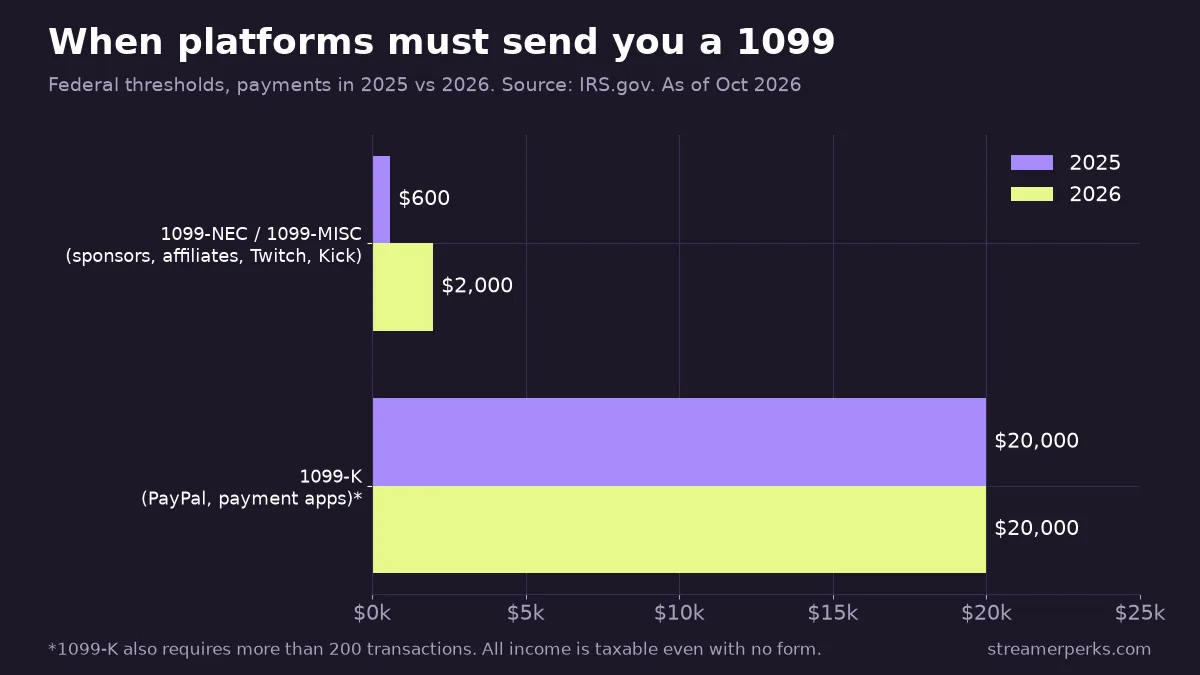
- Kick pays through Stripe. Its tax obligations article says it sends a 1099-NEC to US streamers whose payouts reach the threshold: $600 for 2025 and $2,000 for 2026. You download it from the Stripe tax forms page. More on payouts in our Kick monetization guide.
What changed for 1099 forms in 2026?
Two thresholds moved under the 2025 tax law (the IRS now calls it the Working Families Tax Cuts).
- For 1099-NEC and 1099-MISC, for payments made after December 31, 2025, the reporting threshold rose from $600 to $2,000 (IRS instructions). It may be indexed to inflation starting in 2027. Sponsors, affiliate networks and platforms now only have to send a form once they pay you $2,000 in the year.
- For 1099-K, payment apps and online marketplaces report only when you receive more than $20,000 across more than 200 transactions (IRS 1099-K page). The planned drop to $600 was reversed. This matters if you take tips or sell merch through PayPal or a storefront.
The higher threshold only changes what gets reported, and the IRS is explicit that you must report all business income whether or not a form shows up. A $1,500 sponsor payment with no 1099 attached is still taxable.
Are sponsorships, gifted gear and affiliate income taxable?
Yes, and these are the three income types streamers miss most often.
- Sponsorships and brand deals are business income, whether paid by bank transfer, PayPal or in-kind. If you're pricing deals, our brand deal negotiation guide covers rates and contracts. Set aside money for tax before you spend the fee.
- Gifted gear: IRS Publication 525 says that when you receive property for services, you generally include its fair market value in income in the year you receive it. If a brand sends you a $300 headset in exchange for a review, a mention or a sponsored segment, plan on reporting $300. Unsolicited PR packages with no strings attached are grayer, so ask your CPA, and keep the email that shows whether anything was required.
- Affiliate commissions (Amazon Associates, gear brands, software referrals) are self-employment income too. Networks now send a 1099 only at $2,000+, so track smaller programs yourself. Our affiliate vs. sponsorship comparison explains how the two income types differ in practice.
Bits, subs, ad revenue, Super Chats, Kick subs and donations through a tip page all count as income as well.
What can streamers deduct?
You can deduct ordinary and necessary costs of running the channel. For gear, the question is how fast you deduct it.
- Under the de minimis safe harbor, if you attach the election statement to your return, you can expense items up to $2,500 per invoice or item instead of depreciating them. Most mics, capture cards, lights and webcams fit under that.
- Section 179 covers bigger purchases like a streaming PC or camera: you can expense up to $2,560,000 in 2026 (the limit starts phasing out once total purchases pass $4,090,000), within the limits of your business income. 100% bonus depreciation is also back for qualified property acquired and placed in service after January 19, 2025 (IRS explainer).
- For a home office, the simplified method is $5 per square foot, up to 300 square feet ($1,500). The space has to be used regularly and exclusively for the business, so a bedroom with a bed you sleep in usually doesn't qualify.
- Internet, phone and software you also use personally are deductible only for the business-use share. Write down how you worked out the percentage.
- For driving to events or sponsor shoots, the 2026 standard mileage rate is 72.5 cents per mile for January through June and 76 cents per mile from July 1.
Games bought to stream, music licenses, overlay packs, editor fees and convention travel can also qualify if they're genuinely for the channel.
Do you need an LLC as a streamer?
An LLC is a state-level legal entity. It separates business liabilities, like a sponsor contract dispute, from your personal assets, provided you actually keep finances separate. It isn't a tax category. Per the IRS LLC page, a single-member LLC is "disregarded" by default. You still file Schedule C and pay the same SE tax as a sole proprietor. A multi-member LLC is taxed as a partnership by default.
An LLC makes sense when you sign sponsor contracts with real liability clauses, hire editors or moderators, or want a business bank account and EIN that keep your SSN off W-9s. It mostly doesn't make sense if you earn a few hundred dollars a month and have no contracts. State filing fees and annual fees vary a lot, so check your Secretary of State's site before forming one.
Whatever structure you pick, change your payout and tax details on each platform at the same time so the names match. A mismatch between your W-9 name and TIN is the most common reason Twitch flags tax info as invalid.
When does an S-corp election make sense?
An LLC can elect to be taxed as an S corporation by filing Form 2553. The Form 2553 instructions say an eligible LLC that makes the election is treated as a corporation and doesn't also need Form 8832. The election is due no more than 2 months and 15 days after the start of the tax year it should take effect, or any time in the year before.
The tax benefit is that profit beyond your salary comes out as distributions, which aren't subject to SE tax. The catch is that the IRS requires reasonable compensation to be paid as W-2 wages first. That means running payroll, filing Form 1120-S and paying a bookkeeper or CPA more. For many creators the savings only beat those costs once profit is consistently well above a typical salary for the work. Don't elect S status because a video told you to. Have a CPA run your numbers.
Does the QBI deduction still exist?
Yes. The 2025 law made the 20% qualified business income (QBI) deduction permanent, and it added a $400 minimum deduction for taxpayers with at least $1,000 of QBI from businesses they materially participate in (IRS explainer).
For 2026, taxable income below $201,750 (single) or $403,500 (married filing jointly) avoids the extra limits (Rev. Proc. 2025-32). Above that, the limits phase in up to $276,750 / $553,500. Streaming may count as "performing arts," which is a specified service trade, so the deduction can shrink or disappear for high earners. Below the threshold, that label doesn't matter.
How do quarterly estimated taxes work?
Platforms don't withhold tax from US creators who have valid tax info on file, so you pay it yourself with Form 1040-ES. You generally need to if you expect to owe $1,000 or more.
| 2026 tax item | Figure | Official source |
|---|---|---|
| Self-employment tax | 15.3% on 92.35% of net profit | IRS Topic 554 |
| Social Security wage base | $184,500 | SSA |
| Standard deduction (single / joint) | $16,100 / $32,200 | IRS |
| Estimated tax due dates | Apr 15, Jun 15, Sep 15, 2026; Jan 15, 2027 | IRS FAQ |
| 1099-NEC / 1099-MISC threshold | $2,000 | IRS |
| 1099-K threshold | Over $20,000 and 200+ transactions | IRS |
| QBI threshold (single / joint) | $201,750 / $403,500 | Rev. Proc. 2025-32 |
| Section 179 limit | $2,560,000 | Rev. Proc. 2025-32 |
| Home office, simplified | $5/sq ft, max $1,500 | IRS |
You avoid the underpayment penalty if you pay at least 90% of this year's tax or 100% of last year's. A higher prior-year percentage applies if your AGI is over $150,000 (see Publication 505). If a date falls on a weekend or holiday, the payment is on time the next business day. A simple habit: move 25 to 30% of every payout into a separate tax savings account the day it lands, then adjust once you know your real rate.
What if you stream from outside the US?
Non-US creators don't file US 1099s, but US platforms still need your tax status. You give a Form W-8BEN to the platform, not to the IRS, to certify foreign status and claim any treaty rate.
- YouTube withholds 0 to 30% on earnings from US viewers depending on your country's treaty, 30% with no treaty claim, and up to 24% of total worldwide earnings if no tax info is submitted by December 10. You get a 1042-S by April 14.
- Twitch says the IRS requires it to withhold up to 30% from certain payments to non-US persons, and a treaty claim needs a foreign or US tax ID. Form 1042-S arrives by March 15. EU streamers also get DAC7 reports.
- Kick collects a W-8 or equivalent through Stripe and may withhold where the law requires it.
US withholding is usually creditable against your home-country tax, but how that works depends on your local rules. Ask a local accountant.
A bookkeeping setup that holds up
- Open a separate business checking account and route every platform payout and sponsor payment into it.
- Connect it to accounting software or a spreadsheet, and categorize transactions every month instead of every April.
- Save receipts, sponsor contracts and gifted-product emails in one folder per year.
- Download every 1099 and 1042-S between January and April and reconcile them against your own records. Platform totals sometimes differ from what you received because of timing.
- Book a CPA or EA review before your first year-end, and again before any LLC or S-corp decision.
Figures are as of October 2026. The IRS announces 2027 inflation adjustments each fall, so check the linked pages again before you file.
Related guides
- The Comprehensive 2026 VTuber Setup Guide: Best Trackers, Software, and Commissions
- The Best Audio Mixers and XLR Interfaces for Streamers in 2026
- The Ultimate Comparison of Custom Merch Platforms for Streamers in 2026
- Best Streaming Software Compared (2026): OBS vs StreamElements vs Streamlabs vs XSplit
- How to Get Verified on Twitch, YouTube & Kick (2026): Requirements & Strategies