Best Streaming PC Build Guide (2026): 3 Budgets + Affiliate Programs
StreamerPerks earns a commission from some outbound links. How programs are checked and how the site is funded.
A dedicated streaming PC is one of the best purchases you can make as a content creator in 2026. Whether you stream competitive FPS games at 240fps or run a cozy Just Chatting stream, the right hardware decides whether the broadcast looks smooth and professional or turns into a laggy, pixelated mess.
This guide covers why dual-PC setups are fading (and when you still need one), 3 complete streaming PC builds (Budget, Mid-Tier, High-End), component breakdowns with affiliate links, and the best affiliate programs for PC hardware.
Should you stream from a single PC or dual PC in 2026?
Single PC streaming (recommended for 95% of streamers)
One powerful PC runs both the game and the stream.
Pros: lower cost (one build instead of two), easier setup and maintenance, and modern CPUs + GPUs can handle both jobs.
Cons: a slight performance hit in CPU-heavy games, and troubleshooting gets more complicated.
Best for: most streamers, including those playing AAA games at high settings.
Dual PC streaming (for esports pros and 4K streamers)
One PC for gaming, a second one only for encoding and streaming.
Pros: zero performance impact on the gaming PC, redundancy (if one PC crashes, the other keeps going), and it handles 4K streaming and high-bitrate production.
Cons: 2x the cost, you need a capture card to connect the PCs, and there's more cable management and troubleshooting.
Best for: professional esports players, 24/7 streamers, high-production talk shows.
Verdict for 2026: unless you earn $5K+/month from streaming or play at an ultra-competitive level, stick with a single PC.
Streaming PC build #1: budget beast (~$1,000)
Target streamer: new streamers, 1080p 60fps, moderate settings.
| Part | Product | Approx. Price |
|---|---|---|
| CPU | AMD Ryzen 5 7600 (6-core) | ~$230 |
| GPU | NVIDIA RTX 4060 (8GB) | ~$300 |
| Motherboard | MSI B650M PRO-VDH WiFi | ~$130 |
| RAM | 32GB DDR5-5600 (2x16GB) | ~$90 |
| Storage | 1TB NVMe SSD (PCIe 4.0) | ~$70 |
| PSU | 650W 80+ Gold Modular | ~$70 |
| Case | NZXT H510 Flow (Airflow-focused) | ~$90 |
| CPU Cooler | Thermalright Peerless Assassin 120 | ~$40 |
Total: ~$1,020. Buy the parts on Amazon or Newegg.
Why these parts?
AMD Ryzen 5 7600 (CPU): 6 cores / 12 threads for smooth multitasking, excellent single-core performance for gaming, and a built-in iGPU.
NVIDIA RTX 4060 (GPU): the NVENC encoder gives the best streaming quality with little CPU load. It runs modern games at 1080p Ultra / 1440p Medium and supports AV1 encoding, so it's ready for where YouTube and Twitch are heading.
32GB DDR5 (RAM): 16GB is the bare minimum. With 32GB you can run OBS + game + Chrome + Discord without trouble.
1TB NVMe (storage): fast load times and plenty of space. Go to 2TB if you save VODs locally.
650W Gold (PSU): enough headroom for this build plus future upgrades. Modular means tidier cables.
Performance expectations
- 1080p 60fps streaming: flawless on the Fast/Medium encoder preset
- Games: Fortnite, Valorant, Apex Legends at 144+ fps
- OBS load: 5-10% GPU, 15-25% CPU (with NVENC)
Streaming PC build #2: mid-tier monster (~$1,800)
Target streamer: established creators, 1080p 120fps or 1440p 60fps, high settings.
| Part | Product | Approx. Price |
|---|---|---|
| CPU | AMD Ryzen 7 7800X3D (8-core) | ~$450 |
| GPU | NVIDIA RTX 4070 Super (12GB) | ~$600 |
| Motherboard | ASUS TUF Gaming B650-PLUS WiFi | ~$190 |
| RAM | 32GB DDR5-6000 CL30 (2x16GB) | ~$130 |
| Storage | 2TB NVMe SSD (PCIe 4.0) | ~$120 |
| PSU | 750W 80+ Gold Fully Modular | ~$100 |
| Case | Fractal Design Torrent Compact | ~$150 |
| CPU Cooler | DeepCool AK620 | ~$60 |
Total: ~$1,800. Buy on Amazon, Newegg, or B&H Photo.
Why these parts?
AMD Ryzen 7 7800X3D (CPU): the best gaming CPU in 2026, with 3D V-Cache pushing very high frame rates. Its 8 cores handle streaming + background apps easily, and it draws less power than comparable Intel chips.
NVIDIA RTX 4070 Super (GPU): 12GB of VRAM will hold up for 1440p gaming and streaming, and NVENC AV1 encoding gives top-quality streams with little CPU impact.
32GB DDR5-6000 (RAM): AMD Ryzen 7000 chips run better with fast RAM, and CL30 means lower latency, which improves 1% lows in games.
Performance expectations
- 1440p 60fps streaming: smooth on the Medium/Slow encoder preset
- Games: Warzone, Cyberpunk 2077, Elden Ring at 120+ fps (1440p)
- OBS load: 5% GPU, 10-15% CPU (with NVENC)
Streaming PC build #3: pro powerhouse (~$3,400)
Target streamer: full-time creators, 4K streaming, high-production multi-cam setups, video editing.
| Part | Product | Approx. Price |
|---|---|---|
| CPU | AMD Ryzen 9 7950X (16-core) | ~$650 |
| GPU | NVIDIA RTX 4080 Super (16GB) | ~$1,000 |
| Motherboard | ASUS ROG Strix X670E-E Gaming WiFi | ~$400 |
| RAM | 64GB DDR5-6000 CL30 (2x32GB) | ~$250 |
| Storage (OS) | 2TB NVMe SSD (PCIe 5.0) | ~$250 |
| Storage (Games) | 4TB NVMe SSD (PCIe 4.0) | ~$300 |
| PSU | 1000W 80+ Platinum Fully Modular | ~$200 |
| Case | Lian Li O11 Dynamic EVO | ~$180 |
| CPU Cooler | NZXT Kraken X63 280mm AIO | ~$150 |
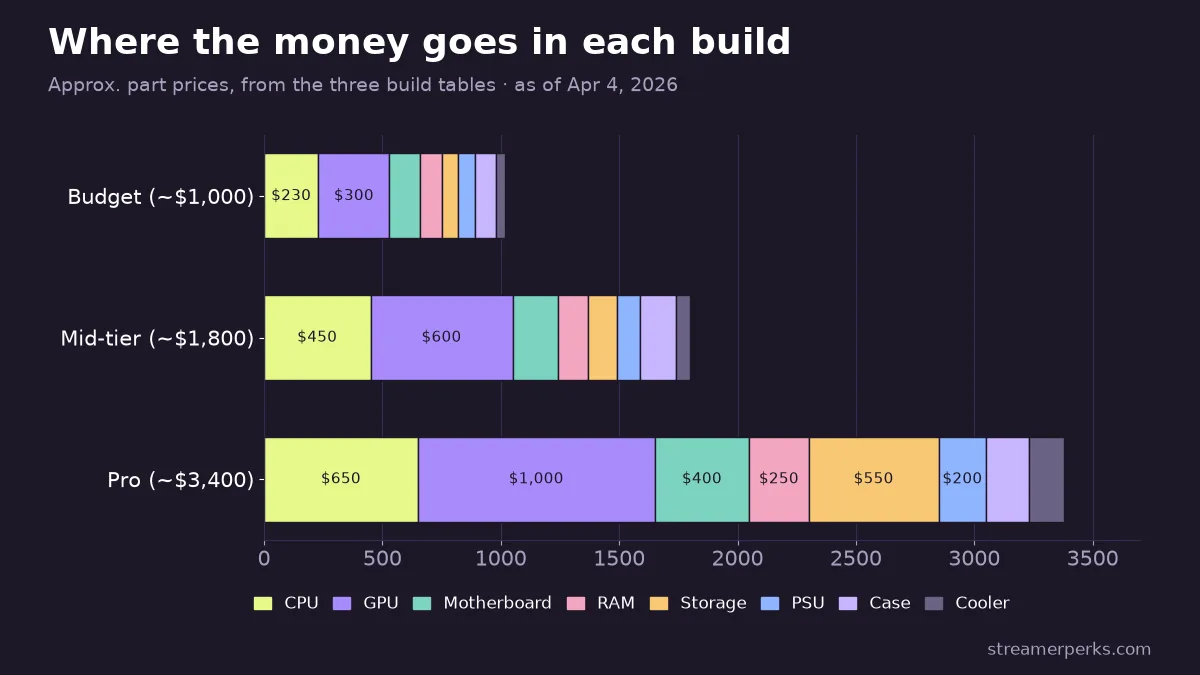
Total: ~$3,380 (before peripherals). Buy on Amazon, Newegg, or B&H Photo.
Why these parts?
AMD Ryzen 9 7950X (CPU): 16 cores / 32 threads run gaming, streaming, video editing, Discord, and Chrome at the same time. It's overkill for pure gaming, but right for creators who edit their VODs.
NVIDIA RTX 4080 Super (GPU): 16GB of VRAM covers 4K gaming + 4K streaming + ray tracing, and NVENC handles 4K 60fps streams with room to spare.
64GB DDR5-6000 (RAM): Adobe Premiere, DaVinci Resolve, and multi-track OBS setups eat RAM. 64GB should last you the next 5+ years.
Performance expectations
- 4K 60fps streaming: smooth on the Medium/Slow encoder preset
- Games: any game maxed out at 1440p 240fps or 4K 120fps
- OBS load: <5% GPU, <10% CPU (with NVENC)
- Video editing: 4K timeline playback with no dropped frames
Key streaming PC components explained
CPU: the multitasker
On a streaming PC, the CPU handles background encoding (if you're not using the GPU encoder), browser source rendering (alerts, chat overlays), and apps like Discord, Spotify, Chrome, and voice chat.
Best CPUs for streaming in 2026:
- Budget: AMD Ryzen 5 7600 or Intel Core i5-13400
- Mid-Tier: AMD Ryzen 7 7800X3D
- High-End: AMD Ryzen 9 7950X or Intel Core i9-14900K
GPU: the encoder
Modern NVIDIA GPUs have a dedicated NVENC encoder that streams without hurting gaming performance.
Why NVIDIA beats AMD for streaming: NVENC gives better quality than AMD's encoder at the same bitrate, OBS plugin support is better, and NVIDIA Broadcast adds AI noise removal and virtual backgrounds.
Best GPUs for streaming in 2026:
- Budget: RTX 4060 (8GB)
- Mid-Tier: RTX 4070 Super (12GB)
- High-End: RTX 4080 Super or RTX 4090 (16GB/24GB)
RAM: how much you need
- Minimum: 16GB (tight, but doable)
- Recommended: 32GB (comfortable multitasking)
- Overkill: 64GB (only needed if you edit 4K video)
Speed matters on AMD Ryzen. DDR5-6000 is the sweet spot in 2026.
Storage: how much space
- 500GB minimum for OS + essential apps
- 1TB+ for a game library
- 2TB+ if you save local VOD recordings
In 2026, don't use HDDs for anything except cold storage backups. Even cheap NVMe SSDs are faster and more reliable.
Best PC hardware affiliate programs
1. Amazon Associates
The Amazon Associates program is the easiest place to start:
- Commission: 3-4% on PC components
- Cookie: 24 hours
- Best for: general hardware builds, one-stop shopping
Why promote it: people trust it, shipping is fast, and nearly everyone has Prime.
2. Newegg Affiliate Program
The Newegg Affiliate Program is aimed at PC enthusiasts:
- Commission: 1-2% (sometimes higher during sales)
- Cookie: 7 days
- Best for: PC enthusiasts, custom builders
Why promote it: better stock of niche parts (custom cables, obscure motherboards).
3. B&H Photo Affiliate Program
The B&H Photo Affiliate Program suits professionals:
- Commission: up to 5%
- Cookie: 14 days
- Best for: professionals, tax-free in most states
4. Micro Center Affiliate Program
Micro Center often beats online prices, so it works well for regional audiences:
- Commission: varies (ask them directly)
- Best for: in-store pickup, CPU+Motherboard combo deals
5. NZXT Affiliate Program
The NZXT Affiliates program fits audiences who care about how their setup looks:
- Commission: 5%
- Cookie: 30 days
- Products: cases, cooling, BLD prebuilt PCs
Why promote it: a strong brand among gamers and streamers, with clean-looking products.
6. Corsair Affiliate Program
The Corsair Gaming Creator Program covers a wide range:
- Commission: 5%
- Cookie: 30 days
- Products: RAM, PSUs, cases, cooling, peripherals
How to promote PC build affiliate links
- Full build guides, like "I Built a $1,000 Streaming PC: Here's Every Part." Unbox each component, show the assembly step by step, and put your affiliate links in the description.
- Upgrade diaries, like "I Upgraded My GPU: Before/After FPS + Stream Quality." Show the performance numbers and compare encoding quality.
- Black Friday / Prime Day round-ups, like "Best PC Deals for Streamers (2026 Black Friday)." Track prices, flag historical lows, and send deal alerts.
- An interactive build configurator: a Google Sheet or Notion page along the lines of "Pick Your Budget, Get a Full Parts List," with affiliate links for each component.
- Troubleshooting videos, like "Why Your Stream is Laggy (And How to Fix It)." Diagnose bottlenecks and recommend upgrades with affiliate links.
Common streaming PC mistakes
Mistake 1: Skimping on RAM
Problem: 16GB fills up fast with OBS + game + Chrome + Discord.
Fix: get 32GB. It's only ~$90 and makes a big difference.
Mistake 2: Buying AMD GPU for Streaming
Problem: AMD's encoder (AMF) produces noticeably lower quality than NVENC.
Fix: stick with NVIDIA RTX cards for streaming PCs.
Mistake 3: Cheap Power Supply
Problem: the PSU fails, the whole system crashes, and the stream dies.
Fix: buy 80+ Gold or better from reputable brands (Corsair, EVGA, Seasonic).
Mistake 4: No Airflow
Problem: the CPU/GPU throttle from heat, frames drop, and the stream lags.
Fix: buy a case with good airflow (mesh front panel) + 2-3 case fans.
Mistake 5: Overlooking Storage Speed
Problem: an HDD or SATA SSD means slow game load times and VOD save delays.
Fix: use NVMe SSDs for everything (they're cheap now).
Do you need to build or can you buy prebuilt?
Build your own if:
- You want the most for your money (save 15-25%)
- You enjoy the process and learning
- You have 4-6 hours for assembly + troubleshooting
Buy prebuilt if:
- You don't want to deal with troubleshooting
- You care about warranty and support
- You need it now
Best prebuilt brands for streaming (2026):
- NZXT BLD: clean designs, good value
- Starforge Systems: creator-focused, backed by streamers
- Maingear: premium, excellent cable management
Final thoughts
A dedicated streaming PC pays for itself: fewer technical headaches, better-looking content (smooth gameplay + clean encoding), faster production (editing VODs, exporting highlights), and more earning potential, since better quality brings more viewers.
Whether you spend $800 or $3,000, buy for what you actually need and can afford. A $1,000 PC you use fully beats a $3,000 machine sitting at 20% usage.
If you're unsure, start with the Mid-Tier build. It's the sweet spot for 90% of streamers and leaves room to upgrade later.
Related articles
Related guides
- The Comprehensive 2026 VTuber Setup Guide: Best Trackers, Software, and Commissions
- The Best Audio Mixers and XLR Interfaces for Streamers in 2026
- The Ultimate Comparison of Custom Merch Platforms for Streamers in 2026
- Best Lighting Equipment for Streamers in 2026 (+ Top Affiliate Programs)
- Stream Deck Setup Guide & Best Affiliate Programs for Streamers (2026)