Best Lighting Equipment for Streamers in 2026 (+ Top Affiliate Programs)
StreamerPerks earns a commission from some outbound links. How programs are checked and how the site is funded.
You can have a $3,000 camera, but if your lighting is bad, you'll still look like you're streaming from a cave.
Lighting is the visual upgrade most streamers skip, even though it costs less than a new microphone and makes a bigger difference than going from 1080p to 4K.
Streaming lights in 2026 go well past basic ring lights. You can now buy smart RGB panels, AI-powered lights that adjust themselves, and studio-grade softboxes at consumer prices.
This guide covers why lighting matters, the best lights by streamer type and budget, 2-point, 3-point and RGB setups, and the affiliate programs that pay for lighting gear.
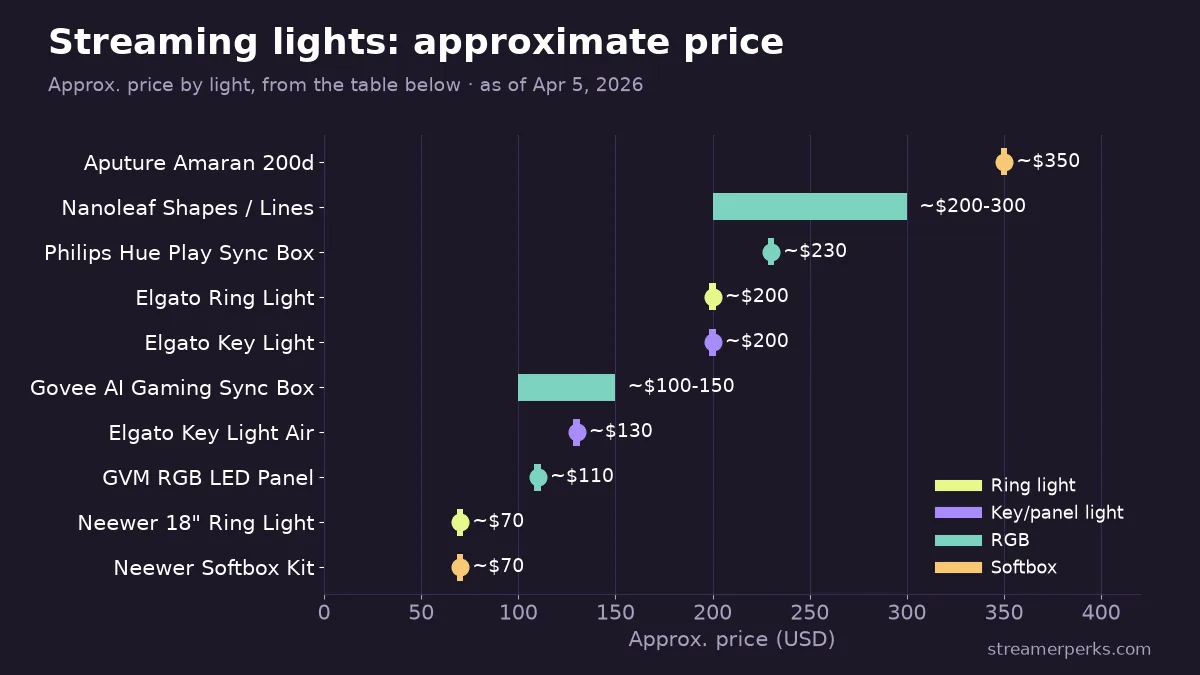
Lighting gear at a glance
| Light | Type | Approx. Price | Best Use Case | Main Strength |
|---|---|---|---|---|
| Neewer 18" Ring Light | Ring light | ~$70 | Budget & mobile setups | Soft, even lighting; no harsh shadows |
| Elgato Ring Light | Ring light | ~$200 | Plug-and-play quality | App control, 2500-7000K range |
| Elgato Key Light | Panel / key light | ~$200 | Set-and-forget desk setup | 2900 lumens, WiFi control, desk clamp |
| Elgato Key Light Air | Panel / key light | ~$130 | Small desks & portable rigs | Compact, lightweight (1400 lumens) |
| GVM RGB LED Panel | RGB panel | ~$110 | Creative RGB on a budget | CRI 97+, 800 RGB colors |
| Govee AI Gaming Sync Box | RGB / smart | ~$100-$150 | Background & accent lighting | Screen-sync and music-reactive |
| Philips Hue Play Sync Box | RGB / smart | ~$230 | High-production RGB setups | Real-time screen sync, smart home integration |
| Nanoleaf Shapes / Lines | RGB / modular | ~$200-$300 | Aesthetic-focused streamers | Music sync and touch-reactive panels |
| Neewer Softbox Kit | Softbox | ~$70 | Studio-quality face lighting | Very soft, flattering light |
| Aputure Amaran 200d | Softbox / pro | ~$350 | Professional streamers & podcasters | Daylight-balanced, wireless control |
Why is lighting the most underrated streaming upgrade?
What bad lighting does to your stream:
- Washed-out face (overexposed by monitor glow)
- Dark, grainy image (underexposed from a single overhead bulb)
- Harsh, unflattering shadows
- Color cast (yellow or blue tint from mismatched light temperatures)
What good lighting fixes:
- Separates you from the background and adds depth
- Removes shadows and evens out skin tone
- Makes cheap webcams look better
- Cuts video noise and grain in darker rooms
Viewers stay longer on streams that look clean.
Lighting basics
Key light, fill light, back light (3-point setup)
The key light is your primary source. It sits 45° to the side of your face, it's the brightest light in the room, and it does most of the work.
The fill light goes on the opposite side. It's softer and dimmer (50-70% of the key light's intensity) and softens the shadows the key light creates.
The back light, also called a rim or hair light, sits behind you, slightly above your head, aimed at your shoulders or hair. It separates you from the background and gives the image depth.
You don't need all three. One good key light plus natural fill from your monitor is enough for 90% of streamers.
Color temperature (Kelvin scale)
- 2700-3000K: warm (yellow/orange), cozy and relaxed
- 4000-5000K: neutral white, balanced and natural
- 5500-6500K: daylight (cool white), energetic, a bit clinical
For streaming, aim for 4500-5500K (neutral to slightly cool). It matches most monitor whites and looks natural on camera.
Don't mix color temperatures (say, a warm bulb next to cool daylight) unless you're doing it on purpose for a creative look.
CRI (color rendering index)
CRI measures how accurately a light shows colors, on a scale of 0-100:
- CRI 80+: acceptable for streaming
- CRI 90+: excellent, skin tones look natural
- CRI 95+: professional film and photo grade
Low-CRI lights make your face look green, red or washed out. For face and key lighting, only buy lights rated CRI 90+.
Best streaming lights by type
1. Ring lights (best for beginners)
Ring lights are circular LEDs that surround your camera. They give soft, even light with no harsh shadows, put the familiar ring catchlight in your eyes, and they're cheap ($30-$150). The downside: they can look flat, and you can't position them very flexibly.
Neewer 18" Ring Light Kit. The Neewer Ring Light Kit costs ~$70 and comes with dimmable 3200-5600K color temperature, a phone/camera mount and a 6' stand. Best for budget streamers and mobile setups. Affiliate: Amazon Associates.
Elgato Ring Light. The Elgato Ring Light costs ~$200 and has app control, a 2500-7000K range, a multi-mount (desk or floor) and solid build quality. Best if you want something that works out of the box. Affiliate: Corsair (Elgato's parent company), 5% commission.
2. Key lights / panel lights (best for a professional look)
Large LED panels give soft, studio-quality light. The light is even and flattering, you can adjust brightness, color temperature and position, and there are no visible hotspots. They cost more ($100-$300+) and take up desk or floor space.
Elgato Key Light (Original). The Elgato Key Light costs ~$200 and puts out 2900 lumens with a 2900-7000K range, WiFi app control and a desk clamp mount. You set it once and control it from a Stream Deck or your phone.
Elgato Key Light Air. The Elgato Key Light Air costs ~$130 and is a smaller, lighter version (1400 lumens). Best for small desks and portable setups.
Verdict: if you're torn between the Air and the standard Key Light, get the standard. The extra brightness is worth $70.
GVM RGB LED Panel. The GVM RGB LED Panel costs ~$110 and offers 800 RGB colors, a 2000-5600K range, CRI 97+ and a remote. Best for creative RGB lighting on a budget. Affiliate: Amazon Associates.
3. RGB/smart lights (best for creative/variety streamers)
Full-spectrum RGB lights suit colored backlighting, accents and themed scenes. You get unlimited colors, sync with games, music and alerts, and an easy way to show your branding. Overdo it and it looks gimmicky, and RGB makes a poor main face light.
Govee AI Gaming Sync Box + RGB Strip Lights. Govee products cost ~$100-$150. They sync with what's on screen, react to music and run from an app. Best for background or accent lighting behind your monitor or desk. Affiliate: Govee Affiliate Program, 6% commission.
Philips Hue Play HDMI Sync Box + Gradient Lightstrip. Philips Hue costs ~$230, syncs with your screen in real time and works with smart home systems. Best for high-production streamers with RGB-themed setups. Affiliate: Amazon Associates.
Nanoleaf Shapes / Lines. Nanoleaf modular wall panels cost ~$200-$300 for a starter kit and have music sync and touch-reactive panels. Best for aesthetic-focused streamers (IRL, Just Chatting, Art). Affiliate: Amazon Associates.
4. Softbox lights (best for pro streamers & video production)
Softboxes are studio lights with diffusion panels and give the most flattering light here. Skin tones look best under them and harsh shadows disappear. They're bulky and need room to set up.
Neewer 2-Pack Softbox Lighting Kit. The Neewer Softbox Kit costs ~$70 and includes 2x 20"×28" softboxes, 85W bulbs and 75" stands. Affiliate: Amazon Associates.
Aputure Amaran 200d. The Aputure Amaran 200d costs ~$350 and gives daylight-balanced (5600K) light, wireless control and softbox compatibility. Best for professional streamers, YouTube creators and podcasters. Affiliate: B&H Photo (up to 5% commission).
Recommended lighting setups by budget
Budget setup ($50-$100): one Neewer 18" Ring Light (~$70) directly behind your camera at face level. You get even light with no harsh shadows, which is fine for a webcam or DSLR stream.
Mid-tier setup ($200-$400): one Elgato Key Light Air ($130) as your key light, 45° to your left or right, plus a small RGB panel or bias light ($50) behind you for separation. If you want, add a second Key Light Air ($130) as fill. This looks like a proper studio.
High-end setup ($500-$1,000): two standard Elgato Key Lights ($400) for key and fill, an RGB LED strip or Govee Glide ($100) for background accent, and Nanoleaf Shapes ($200) on the wall. That's broadcast-level production with plenty of room to get creative.
How should you position your streaming lights?
Step 1: Place your key light
- 45° to the side of your camera (left or right)
- Slightly above eye level, angled down 15-20°
- 3-5 feet from your face
Check: you should see a subtle shadow on the far side of your face. That's your depth.
Step 2: Add a fill light (optional)
- Opposite side from the key light
- Lower intensity (50-70% of the key light)
- Same height or slightly lower
Check: shadows should be softer but still visible, not flat.
Step 3: Add a back light (optional)
- Behind you, aimed at your shoulders or hair
- Slightly above your head
- White or colored (RGB) both work
Check: you should see a thin rim of light separating you from the background.
Step 4: Adjust camera exposure
Open your camera software (OBS, Streamlabs, etc.) and set exposure and brightness so your face is well lit but not blown out. Then check white balance. Skin should look natural, not yellow or blue.
Common lighting mistakes (and fixes)
Mistake 1: Lighting from above
Problem: shadows under your eyes, nose and chin.
Fix: move the light to face level or slightly above, angled down.
Mistake 2: Light behind the camera (too close)
Problem: flat, boring light with no depth.
Fix: move the light 45° to the side.
Mistake 3: Relying only on RGB lights
Problem: colored light makes skin tones look wrong.
Fix: use white light (4500-5500K) for key and fill, and keep RGB for the background.
Mistake 4: Window light behind you
Problem: you turn into a silhouette because the camera exposes for the window instead of your face.
Fix: face the window and use it as your key light, or close the blinds and use artificial light.
Mistake 5: Too many lights
Problem: an overlit, washed-out look.
Fix: start with one key light. Add fill or back lights only if you need them.
Best lighting affiliate programs
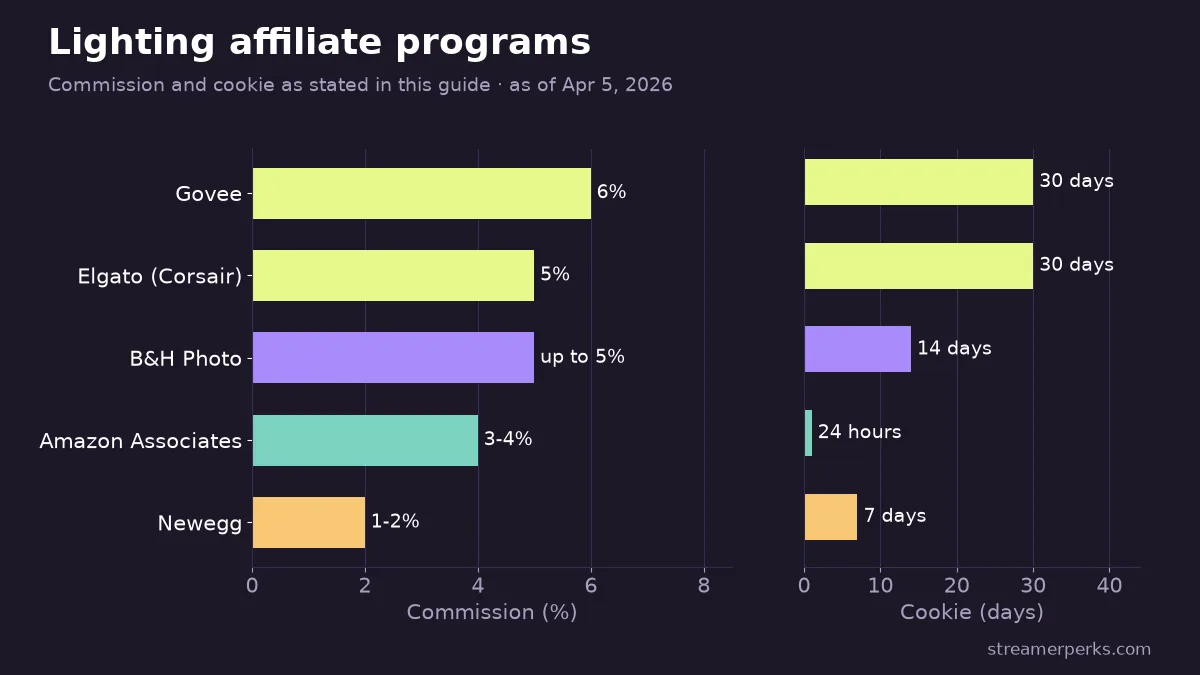
1. Elgato (Corsair)
The Corsair Gaming Creator Program covers all Elgato lighting:
- Commission: 5%
- Cookie: 30 days
- Products: Key Light, Key Light Air, Ring Light
Why promote it: Elgato is the default streamer lighting brand. People trust it, so it's an easy sell.
2. Amazon Associates
The Amazon Associates program covers a wide range:
- Commission: 3-4%
- Cookie: 24 hours
- Products: Neewer, GVM, Philips Hue, Nanoleaf, Govee
Why promote it: viewers can buy everything in one place, shipping is fast and checkout is easy.
3. Govee Affiliate Program
The Govee Affiliate Program focuses on RGB lighting:
- Commission: 6%
- Cookie: 30 days
Why promote it: it's a popular pick for RGB background lighting, and the brand keeps growing.
4. B&H Photo
The B&H Photo Affiliate Program suits professional gear:
- Commission: Up to 5%
- Cookie: 14 days
- Products: Aputure, professional softboxes, studio gear
Why promote it: it suits advanced creators shopping for pro-grade lighting.
5. Newegg Affiliate Program
The Newegg Affiliate Program covers electronics bundles:
- Commission: 1-2%
- Cookie: 7 days
It works well for bundles (lights, mounts and cables together).
How to promote lighting affiliate links
- Before/after comparisons ("I Fixed My Lighting: Here's the Difference"). Use a split screen, show the setup, and put your affiliate links in the description.
- Lighting tutorials ("How to Set Up 3-Point Lighting for Streaming"). Go step by step and show common mistakes and fixes.
- Budget vs premium showdowns ("$50 Ring Light vs $200 Elgato Key Light: Is It Worth It?"). A side-by-side comparison helps viewers decide by budget.
- Full setup tours ("My Entire Stream Setup Tour: Gear, Lighting, Cable Management"). Show how lighting fits the rest of your setup and build an Amazon Storefront with every product.
- Aesthetic builds ("Building the Perfect Cozy/Cyberpunk/Minimalist Stream Setup"). Put RGB lighting and Nanoleaf panels front and center.
Should you invest in lighting or a better camera first?
Short answer: lighting.
A $50 ring light will make a $30 Logitech webcam look better than a $500 DSLR with no lighting.
Upgrade order:
- Basic lighting (ring light or single panel)
- Better microphone (audio > video quality)
- Upgraded camera (once you've gotten everything you can out of your lighting)
Final thoughts
Lighting is the cheapest upgrade that makes a visible difference to your stream.
For under $200 you can go from "streaming in a dark room" to "looks like a professional broadcast," and your audience will notice.
Start simple. Get one good key light (an Elgato Key Light Air or a Neewer ring light), position it correctly and adjust your camera exposure.
Then build on it. A fill light adds dimension, and RGB background lights add personality.
You don't need to copy anyone else's setup. Light your face clearly and flatteringly so viewers look at you, not your shadows.
Related articles
Related guides
- The Comprehensive 2026 VTuber Setup Guide: Best Trackers, Software, and Commissions
- The Best Audio Mixers and XLR Interfaces for Streamers in 2026
- The Ultimate Comparison of Custom Merch Platforms for Streamers in 2026
- Best Streaming PC Build Guide (2026): 3 Budgets + Affiliate Programs
- Stream Deck Setup Guide & Best Affiliate Programs for Streamers (2026)