AI Tools for Streamers in 2026: Automate, Enhance & Grow Your Channel
StreamerPerks earns a commission from some outbound links. How programs are checked and how the site is funded.
A lot of the grunt work in streaming can now be handed to AI. Editing, scripting and chat management used to eat hours every week, and much of it can now be automated or at least sped up. In 2026, streamers who use these tools simply get more done than streamers who don't.
This guide sorts the best AI tools for streamers by use case, with pricing, features, and affiliate programs where they exist.
Why do AI tools matter for streamers in 2026?
- They save time on highlight clips, thumbnails and social posting.
- They improve content with AI editing, voice enhancement and real-time translation.
- They help you grow through analytics, SEO for VODs and personalized chatbots.
- They help you earn more: faster turnaround means more uploads, and more uploads mean more revenue.
1. Which AI tools edit streams and generate highlights?
Gling AI
Gling AI automatically removes silences, bad takes, and filler words from raw footage.
Best for: YouTube creators and VOD editors who want faster post-production.
Pricing: Free trial available; paid plans start at $10/month.
Affiliate program: Not publicly listed, but you can contact them about a partnership.
OpusClip
OpusClip cuts long streams into short clips for TikTok, YouTube Shorts, and Instagram Reels. The AI picks the moments most likely to hold attention and writes captions for them.
Best for: Streamers who want to repurpose content for social media without editing by hand.
Pricing: Free tier available; Pro plans from $9.50/month.
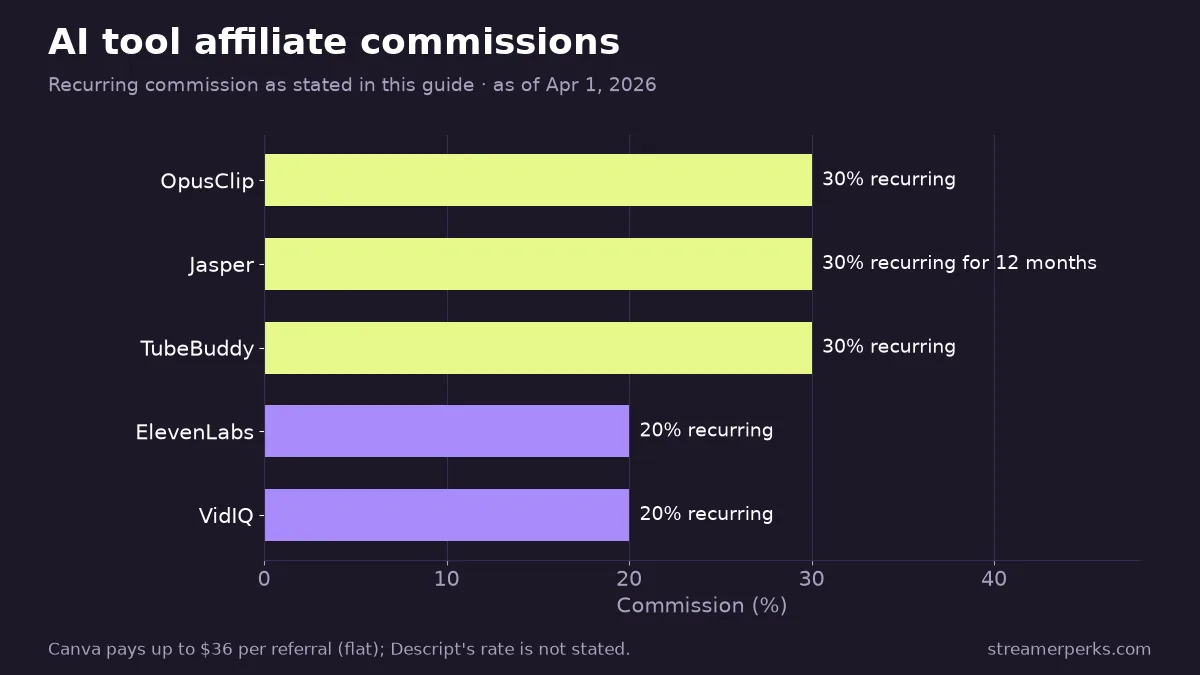
Affiliate program: Yes. The OpusClip Affiliate Program pays 30% recurring commission.
Descript
Descript lets you edit video by editing the transcript. It also has AI voice cloning, filler word removal, and Studio Sound, which cleans audio to a near-studio level.
Best for: Streamers making podcasts, tutorials, or narrative content.
Pricing: Free plan; Creator plan at $12/month, Pro at $24/month.
Affiliate program: Yes. The Descript Partner Program pays recurring commissions.
2. AI thumbnail and graphics generation
Canva AI (Magic Studio)
Canva AI handles thumbnail creation, background removal, text-to-image generation, and design suggestions.
Best for: Streamers who need clean thumbnails fast and don't know Photoshop.
Pricing: Free plan available; Canva Pro at $12.99/month.
Affiliate program: Yes. The Canva Affiliate Program pays up to $36 per referral.
Midjourney
Midjourney generates high-quality AI images you can use for custom thumbnails, channel art, and stream overlays.
Best for: Streamers who want artistic, one-of-a-kind visuals.
Pricing: Starts at $10/month (Basic plan).
Affiliate program: No official program yet, though it gets a lot of attention in creator communities.
3. AI chatbots and audience engagement
Moobot (with GPT integration)
Moobot combines Twitch chat moderation with AI chat responses. Hook it up to OpenAI's GPT and your bot can answer viewer questions sensibly instead of with canned replies.
Best for: Twitch streamers who want automated moderation and a chat that talks back.
Pricing: Free for basic features; premium tiers for advanced automation.
StreamElements AI (Ellie Bot)
StreamElements adds AI chat commands, automated responses, and viewer sentiment analysis.
Best for: Multi-platform streamers who already use StreamElements for alerts and overlays.
Pricing: Free.
4. AI voice and audio enhancement
Adobe Podcast AI (formerly Project Shasta)
Adobe Podcast AI makes almost any recording sound studio-grade by stripping out background noise, echo, and bad room acoustics.
Best for: Streamers recording podcasts or tutorials on a mediocre audio setup.
Pricing: Free in beta; included in Adobe Creative Cloud plans.
Krisp
Krisp runs real-time AI noise cancellation on your mic and speaker audio. Dog barks, keyboard clatter, roommates: it filters them out.
Best for: Streamers who can't control their recording environment.
Pricing: Free tier (60 mins/day); Pro at $8/month (unlimited).
Affiliate program: Not currently public, but they do partner with creators.
ElevenLabs
ElevenLabs clones your voice for voiceovers or generates very realistic text-to-speech in multiple languages.
Best for: Streamers making multilingual content, tutorials, or narrative videos without recording every line.
Pricing: Free tier (10k characters/month); paid from $5/month.
Affiliate program: Yes. The ElevenLabs Creator Program pays 20% recurring commission.
5. AI scripting and content ideation
ChatGPT (OpenAI)
ChatGPT writes video scripts, stream titles, SEO descriptions and social captions, and it's a decent brainstorming partner when you're out of ideas.
Best for: Every streamer. Period.
Pricing: Free; ChatGPT Plus at $20/month for GPT-4 access.
Jasper AI
Jasper AI is an AI copywriter built for marketing: blog posts, YouTube descriptions, email campaigns.
Best for: Streamers building a brand outside of live streaming (blogs, newsletters, product launches).
Pricing: Starts at $49/month.
Affiliate program: Yes. The Jasper Affiliate Program pays 30% recurring for 12 months.
6. AI analytics and SEO optimization
VidIQ
VidIQ covers YouTube SEO with AI keyword research, title suggestions, and competitor analysis.
Best for: YouTube streamers who want their VODs to rank higher and pull more views.
Pricing: Free tier; Pro from $7.50/month.
Affiliate program: Yes. The VidIQ Affiliate Program pays 20% recurring commission.
TubeBuddy
TubeBuddy does AI-driven SEO, A/B tests thumbnails, and has a keyword explorer much like VidIQ's.
Best for: YouTube creators optimizing for search and discovery.
Pricing: Free tier; Star plan at $2.40/month.
Affiliate program: Yes. The TubeBuddy Affiliate Program pays 30% recurring.
7. AI streaming assistants
OWN3D AI Stream Deck Plugin
OWN3D generates alerts, overlays, and scene transitions that react to chat sentiment and what's happening on stream.
Best for: Streamers who want visuals that respond to the room.
Pricing: Included with the OWN3D Pro subscription ($9.99/month).
TwitchGPT (Community Project)
TwitchGPT is an open-source Twitch chatbot built on GPT models. You can customize all of it.
Best for: Technical streamers who want full control over their AI bot.
Pricing: Free (you pay for OpenAI API usage).
How do you choose the right AI tools for your stream?
| Use case | Recommended tool |
|---|---|
| Fast highlight clips | OpusClip, Gling AI |
| Thumbnail design | Canva AI, Midjourney |
| Voice enhancement | Adobe Podcast AI, Krisp |
| Chat automation | Moobot, StreamElements AI |
| YouTube SEO | VidIQ, TubeBuddy |
| Scripting & ideation | ChatGPT, Jasper AI |
| Multilingual content | ElevenLabs, Descript |
Can you earn affiliate commission from AI tools?
Yes. Many of these tools run affiliate programs with recurring commissions. A few formats that work for promoting them:
- Setup tutorials, such as "How I Use OpusClip to Create 30 TikToks Per Week"
- Before/after demos that put raw footage next to the AI-edited result
- Template giveaways, where you share your Canva thumbnail templates with affiliate links
- Comparison videos, such as "VidIQ vs TubeBuddy: Which AI Tool Grew My Channel Faster?"
Final thoughts
None of these tools replace creativity. What they do is take the repetitive work off your plate so you can spend that time on your audience, your content, and the business side of the channel.
Solo creator or small team, adding even 2-3 of these tools can save you 10+ hours per week. That's time you can put into revenue streams you never got around to before.
Start with one or two, see what sticks, and add more from there.
Related articles
Related guides
- Amazon Influencer Program for Streamers: How It Works and How to Qualify
- Epic Games Support-A-Creator: How Fortnite Creator Codes Pay
- YouTube Shopping Affiliate Program: Eligibility, Commissions and Live Tagging (2026)
- The Comprehensive 2026 VTuber Setup Guide: Best Trackers, Software, and Commissions
- The Best Audio Mixers and XLR Interfaces for Streamers in 2026