Best Donation Platforms for Streamers (2026): Ko-fi vs Streamlabs vs Buy Me a Coffee vs Patreon
StreamerPerks earns a commission from some outbound links. How programs are checked and how the site is funded.
Direct support from your audience is the cleanest money a creator can make. There's no algorithm, no ad rate, and no brand deal to negotiate. Your community decides to pay you, and that's it. The platform you pick for tips, donations and memberships still matters a lot, though: it can decide whether you keep 95% of what fans send or lose 15-30% to fees you didn't see coming.
Below is a straight comparison of the four biggest donation and membership platforms for streamers in 2026: Ko-fi, Streamlabs, Buy Me a Coffee, and Patreon.
What fees do donation platforms charge?
Platform fees run from 0% (Streamlabs, Ko-fi Gold) to 10% (Patreon Standard), and most platforms add payment processing on top.
| Platform | Platform Fee | Payment Processing | Monthly Cost | Payout Speed |
|---|---|---|---|---|
| Ko-fi (Free) | 5% | Included via PayPal/Stripe | $0 | Instant |
| Ko-fi Gold | 0% | Included via PayPal/Stripe | $12/month | Instant |
| Streamlabs | 0% | PayPal fees only (~2.9% + $0.30) | $0 | Instant via PayPal |
| Buy Me a Coffee | 5% | Included via Stripe | $0 | Instant |
| Patreon (Standard) | 10% | 2.9% + $0.30 (varies) | $0 | Monthly (1st-5th) |
| Patreon (Legacy Pro) | 8% | 2.9% + $0.30 | $0 | Monthly |
| Patreon (Founders) | 5% | ~1.6% + $0.30 | $0 | Monthly |
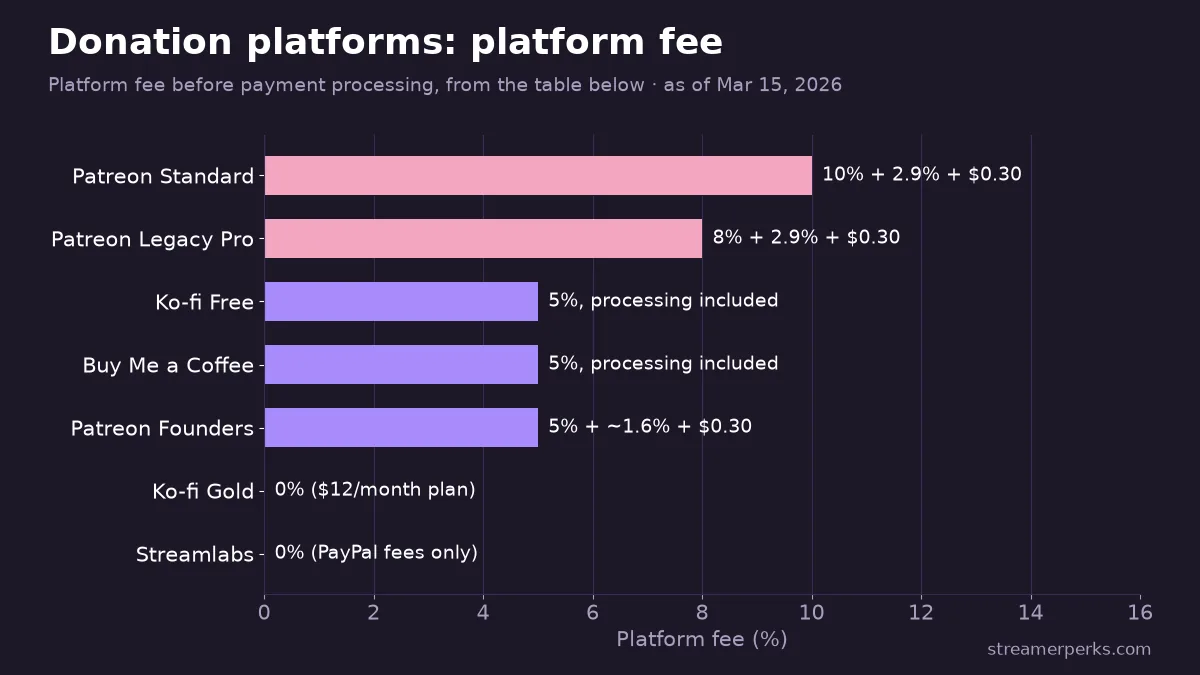
Note: Patreon's 10% standard fee applies to all new creators publishing after August 4, 2025.
Platform breakdowns
Ko-fi: the all-purpose creator toolkit
Ko-fi began as a simple tip jar. It has since grown into a full monetization platform with tips, memberships, a digital shop, commissions, and even stream alerts.
Fee structure:
- Free plan: 5% platform fee on all transactions.
- Ko-fi Gold ($12/month): 0% platform fee.
- Payouts: instant via PayPal or Stripe, with no waiting period and no minimum.
Main features:
- One-time tips. Supporters can donate without making an account, and less friction means more tips.
- Membership tiers. You can set up several tiers with exclusive content, Discord roles, early access, and merch rewards.
- Ko-fi Shop. Sell digital downloads (overlays, emotes, presets) and physical merch with no listing fees.
- Commissions. Take custom work requests with set prices and slot management.
- Stream alerts. Works with OBS, Twitch, and YouTube to show tip notifications on stream.
Who it's best for:
Ko-fi suits small to mid-size creators who want one platform for everything without a monthly bill. The Gold plan at $12/month pays for itself once you process more than $240/month.
Limitations:
- The free plan doesn't let you customize much.
- Pages keep a Ko-fi look that may clash with your own branding.
Streamlabs: zero-fee tips for live streamers
The Streamlabs tip page is one of the best deals around, because it charges 0% platform fees on donations.
Fee structure:
- Platform fee: 0%. Streamlabs takes no cut.
- Payment processing: standard PayPal fees apply (~2.9% + $0.30 per transaction).
Main features:
- One-time and recurring tips. Viewers can set up monthly support directly.
- Stream integration. Tips trigger on-stream alerts, media sharing, and text-to-speech messages.
- Tip page customization. Add your branding, streaming schedule, social links, and a merch shelf.
- Streamlabs Merch. Sell custom merchandise with no upfront costs.
Who it's best for:
Streamlabs is the pick for live streamers whose income comes mostly from one-time tips during broadcasts. If tips are most of your money and you want to keep as much as possible, nothing beats a 0% platform fee.
Limitations:
- It's a tip jar at heart, and weak as a membership or subscription platform.
- It depends on PayPal, which is a problem in some regions.
- There's no built-in digital product shop or commission system.
Buy Me a Coffee: simplicity first
Buy Me a Coffee (BMC) built its reputation on frictionless tipping. The platform is deliberately minimal, so a supporter can chip in within seconds.
Fee structure:
- Platform fee: 5% flat on all transactions. No monthly fees.
- Payment processing: handled through Stripe (included in the 5%).
- Payouts: instant to a bank account or PayPal. No waiting periods or minimums.
Main features:
- One-click tipping. Guest checkout means supporters don't need an account.
- Memberships. Monthly recurring tiers with exclusive content.
- Built-in newsletter. Email your supporters straight from the platform.
- Mobile apps. Creator and supporter apps are available for iOS and Android.
Who it's best for:
Buy Me a Coffee fits creators who care about simplicity more than anything else. If all you want is a clean page where people can support you in one click, BMC does exactly that.
Limitations:
- No discovery. There's no "explore" page where new supporters can find you.
- The 5% fee stays the same at any volume, while Ko-fi Gold drops to 0%.
- No native stream alert integration.
Patreon: the membership heavyweight
Patreon was the first big name in creator memberships and is still the one most people recognize.
Fee structure (new creators, post-August 4, 2025):
- Platform fee: 10% of all membership and one-time purchase revenue.
- Payment processing: 2.9% + $0.30 per transaction (US-based).
- Total effective fee: approximately 13-15% on a typical $5/month membership.
Main features:
- Tiered memberships. Unlimited tiers with fine-grained control over perks.
- Video hosting. Up to 100 hours/month included for creators with paying fans.
- Community tools. Built-in chat, polls, comments, and Q&A.
- Audience insights. Detailed analytics on patron behavior and retention.
- Brand recognition. Everyone knows what "Support me on Patreon" means.
Who it's best for:
Patreon works best for established creators whose fans will pay for premium content. If you make a lot of exclusive content, the membership model and the trust people have in the brand can justify the higher fees.
Limitations:
- The 10% platform fee for new creators is the highest in this comparison.
- Monthly payouts can squeeze cash flow for smaller creators.
- iOS in-app purchase fees can eat up to 30% of revenue when supporters pay through the app.
What are the hidden costs of donation platforms?
Payment processing fees
| Payment Method | Typical Fee |
|---|---|
| Stripe (US) | 2.9% + $0.30 |
| PayPal (US) | 2.9% + $0.30 |
| PayPal (International) | 3.9% + $0.30 |
| Currency conversion | 2.5% additional |
The $3 tip problem: on a $3 tip, the $0.30 flat processing fee is 10% of the transaction. Small tips cost far more to process, proportionally, than big ones.
How fast do donation platforms pay out?
Ko-fi, Streamlabs, and Buy Me a Coffee pay out instantly with no minimum; Patreon pays monthly, between the 1st and 5th.
| Platform | Payout Speed | Minimum |
|---|---|---|
| Ko-fi | Instant | None |
| Streamlabs | Instant (PayPal) | None |
| Buy Me a Coffee | Instant | None |
| Patreon | Monthly (1st-5th) | $1+ |
Which donation platform is right for your channel size?
Just starting out (0-100 regular viewers)
Use: Streamlabs + Buy Me a Coffee
Keep it simple. Use Streamlabs for live tips (free) and BMC as the link in your social bios. Hold off on memberships until your community actually asks for them.
Growing creator (100-1,000 regular viewers)
Use: Streamlabs + Ko-fi Gold
This is where Ko-fi Gold ($12/month) starts to make financial sense. Once you're processing enough tips, the 0% platform fee saves you more than the $12 it costs.
Established streamer (1,000+ regular viewers)
Use: Streamlabs + Patreon (or Ko-fi Gold for cost savings)
If you make a lot of exclusive content, Patreon's name recognition and features are worth the higher fees. If fees matter more to you, Ko-fi Gold gives you almost the same membership features for a fraction of the cost.
Conclusion
No single donation platform is best for everyone. The right one depends on your situation:
- Want zero platform fees on tips? Use Streamlabs.
- Want simplicity and instant payouts? Use Buy Me a Coffee.
- Want an all-in-one platform with optional 0% fees? Use Ko-fi (Gold).
- Want the strongest membership features and brand trust? Use Patreon.
You also don't have to pick just one. These platforms work fine side by side, so use each for what it does best and let your supporters choose how they want to pay.
Related guides
- The Ultimate Comparison of Custom Merch Platforms for Streamers in 2026
- Best Streaming Software Compared (2026): OBS vs StreamElements vs Streamlabs vs XSplit
- Discord Monetization for Streamers: Memberships, Affiliate Links & Sponsor Deals (2026)
- Twitch Subscription Revenue Share (2026): How Subs Work, What You Actually Earn, and How to Increase It
- Twitch Payout Schedule & Minimum Threshold (2026): When You Get Paid and How to Fix Delays