YouTube Live Monetization (2026): All Revenue Streams, Requirements, and a Practical Creator Playbook
StreamerPerks earns a commission from some outbound links. How programs are checked and how the site is funded.
If you're searching "YouTube Live monetization 2026", you're probably trying to answer one of these:
- What are all the ways to make money on YouTube Live?
- What do I need to qualify (and what blocks monetization)?
- How do I make live streams profitable without losing viewers?
This guide treats YouTube Live monetization as a system you can set up: the revenue streams, the setup steps, and how to tune them.
> Note: YouTube monetization eligibility and features can change by region and policy. Always check inside YouTube Studio.
Quick answer
You can monetize YouTube Live through a mix of:
- Ads (where eligible)
- Live fan funding (e.g., Super Chat / stickers or similar features)
- Channel memberships
- Shopping/affiliate links
- Sponsorships and brand deals
The best approach is usually to stack several of these instead of depending on one.
The YouTube Live monetization system (think in layers)
A profitable YouTube Live channel usually earns on three levels:
- Platform monetization (ads + fan funding + memberships)
- Commerce monetization (affiliate + shopping)
- Brand monetization (sponsorships)
Build only the first one and a single policy change or a bad month can wipe out a big share of your income.
What are the requirements to monetise YouTube Live?
Whether you can monetize YouTube Live usually comes down to:
- YouTube Partner Program eligibility
- channel policy compliance
- content suitability (brand safety)
- whether specific features are available in your region
Being eligible for the program doesn't mean you get every monetization tool. Some aren't offered in all regions.
Practical advice: don't plan a business around a feature you can't see in your Studio yet.
Revenue stream #1: ads on live streams
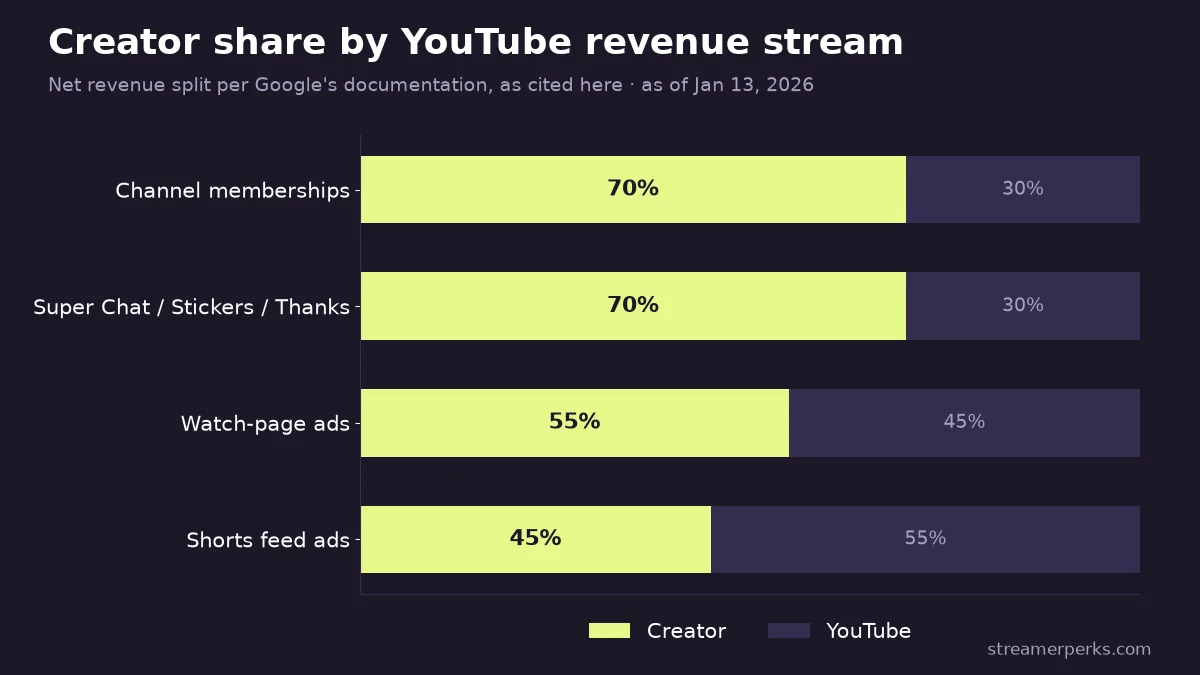
Ads can add up once you have scale, but for a small channel they're rarely the best place to start. According to Google's official documentation, creators receive 55% of net revenues from ads on watch-page videos, and 45% of the revenue allocated to them for Shorts feed ads.
How live ads typically behave
- Ad revenue depends on your audience, their location, and advertiser demand.
- Live viewership goes up and down, so revenue is hard to predict.
How to use ads without killing retention
- Don't build the stream around the ad breaks. The stream itself is the reason people are there.
- Run ads at natural transitions, like breaks or between segments.
- Don't force an ad in the middle of a tense or important moment.
Viewers who start associating your stream with interruptions stop coming back.
Revenue stream #2: fan funding (Super Chat-style tools)
Fan funding works because it's emotional and happens in the moment. Per Google's official documentation, creators receive 70% of net revenues from Super Chat, Super Stickers, and Super Thanks.
What viewers are paying for
Usually one of these:
- recognition
- influence (their message gets highlighted)
- belonging (supporting a creator they like)
Ethical monetization: keep it positive
Don't pressure people or guilt them into paying.
Better: "Thank you for the support, appreciate you."
Worse: "If we don't hit X today I'll stop streaming."
Channels that last are the ones viewers trust.
Revenue stream #3: channel memberships
Memberships are YouTube's recurring income. Per Google's official documentation, creators receive 70% of net revenues from channel memberships.
What makes memberships work
Memberships do well when the perks are simple, the value shows up consistently, and members feel part of something with a clear identity.
People join a club they want to belong to. They don't want to feel like they're paying to get past a wall.
Membership perks that are actually manageable
- member-only emojis and badges
- occasional members-only Q&A
- community posts and early access to VODs
Skip perks that need a steady stream of extra production unless you have staff.
Revenue stream #4: shopping and affiliate links
Affiliate income keeps earning when you're offline. Link relevant products in your description and bring them up during streams when they fit the conversation.
What mistakes cost YouTube streamers the most money?
- Monetizing too early and too hard.
- Cramming the stream with CTAs.
- No predictable schedule.
- No clear reason to watch live ("why watch this live?").
- Relying only on ads.
Extended FAQs
Do you need the Partner Program to monetize YouTube Live?
Most platform monetization tools require eligibility and approval, and the exact tools vary by region. Check inside YouTube Studio.
What's the best monetization method for a small live channel?
Usually memberships + affiliate links + occasional fan funding. Ads start to matter later.
Is Super Chat better than memberships?
They do different jobs. Super Chat comes in bursts during events; memberships pay every month. Recurring income is usually more stable.
How do you increase live donations ethically?
Give people a reason to support you, reply quickly, and keep the community positive. Pressure tactics cost you trust.
Should you run mid-roll ads on live?
Only if you can put them in natural breaks. Ads at big moments hurt retention.
Do you need to stream long hours to make money?
Not necessarily. A tight, well-planned stream can beat a long one with no structure.
How do you avoid burnout?
Keep things simple. Pick perks and a schedule you can keep up. Monetization doesn't help if you quit.
What's the best first step?
Open YouTube Studio and see which monetization tools you actually have. Plan around those.
Related guides
- YouTube Shopping Affiliate Program: Eligibility, Commissions and Live Tagging (2026)
- Facebook vs YouTube Earnings (2026): Which Pays More, Which Is Easier, and How Creators Should Choose
- Kick Monetization Explained (2026): How Streamers Make Money, What to Expect, and How to Build Stable Income
- How Much Do Streamers Make? Rates for Every Revenue Stream (2026)
- The Ultimate Comparison of Custom Merch Platforms for Streamers in 2026