Twitch Bits to USD: What 1 Bit Is Worth and How Much Streamers Earn
StreamerPerks earns a commission from some outbound links. How programs are checked and how the site is funded.
One Twitch Bit is worth $0.01 to the streamer who receives it. That means 100 Bits pay out $1.00, 1,000 Bits pay $10.00 and 10,000 Bits pay $100.00, no matter which country the viewer is in or what they paid for the pack. The viewer pays Twitch's pack price, which is higher and varies by device and currency.
Below: the conversion table, what viewers pay, the Extension and Power-up exceptions, cheermote tiers, and how Bit money gets to your bank account.
How much is 1 Bit on Twitch?
Twitch's help center states that monetized streamers receive a share of Bits revenue equal to 1 cent per Bit used to cheer in their channel. The rate is fixed in US dollars. Twitch explains in its Bits price adjustment article that Bits prices are pegged to USD, so when a viewer in another currency cheers, the streamer's earnings are still converted at the USD rate.
So there are two different answers to "how much is 1 Bit":
- To the streamer: $0.01, every time, for a standard cheer.
- To the viewer: whatever the pack cost divided by the number of Bits in it. That number is set by Twitch, shown at checkout and can differ between web and mobile.
The streamer answer is the one that matters for income maths. A viewer who bought Bits during a discount and a viewer who paid full price on an iPhone deliver exactly the same $0.01 per Bit to you.
Twitch Bits to USD conversion table
This table shows what the streamer earns from a standard cheer at 1 cent per Bit, plus what the same Bits pay when used inside an Extension (80% of 1 cent, explained below).
| Bits cheered | Streamer earns (cheer or Power-up) | Streamer earns (Extension) |
|---|---|---|
| 1 | $0.01 | $0.008 |
| 100 | $1.00 | $0.80 |
| 500 | $5.00 | $4.00 |
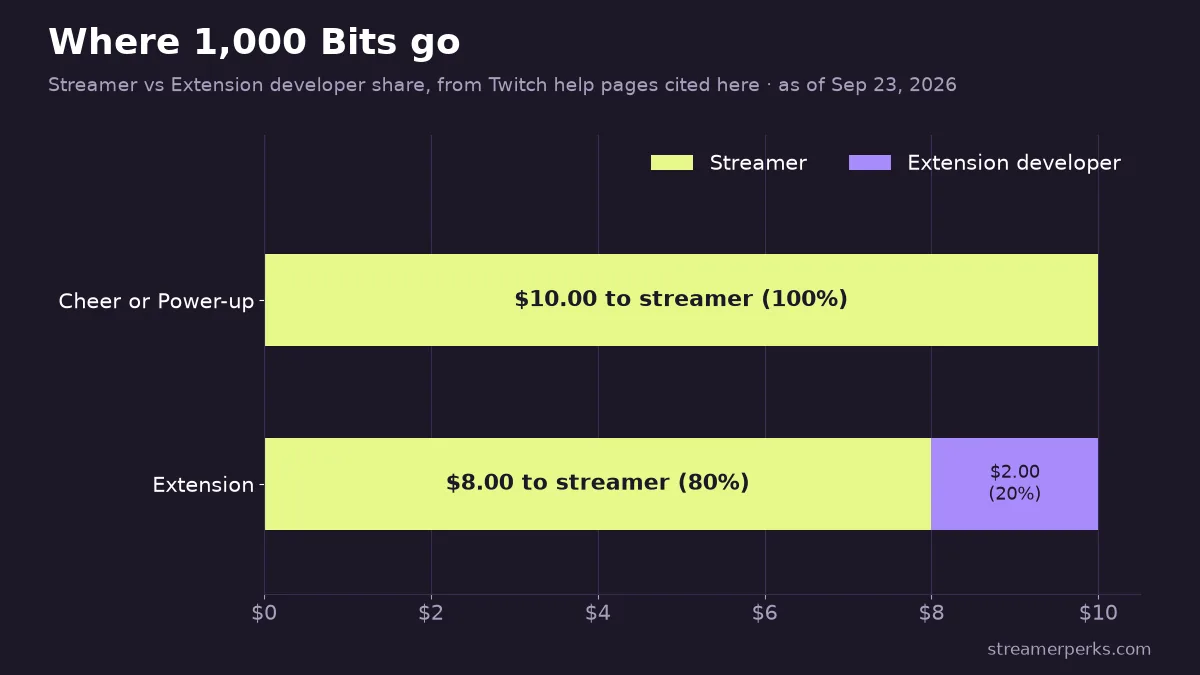
| 1,000 | $10.00 | $8.00 |
| 1,500 | $15.00 | $12.00 |
| 5,000 | $50.00 | $40.00 |
| 10,000 | $100.00 | $80.00 |
| 25,000 | $250.00 | $200.00 |
| 100,000 | $1,000.00 | $800.00 |
To convert any amount yourself, divide the number of Bits by 100. The result is dollars to the streamer before tax.
How much do viewers pay for Bits?
Viewers buy Bits in packs. Twitch's web store currently lists packs of 100, 500, 1,500, 5,000, 10,000 and 25,000 Bits. We don't print a price list here because Twitch shows prices in the buyer's local currency, adjusts non-USD prices manually from time to time and runs occasional promotions. The live price is on twitch.tv/bits, or in any channel's chat via the Bits icon and "Get Bits".
What is stable:
- Pack price is higher than the streamer's cent per Bit. The difference covers Twitch's share and payment costs.
- Mobile apps usually cost more. Purchases in the iOS and Android apps go through Apple or Google, and their processing fees can push the price up. Twitch's own advice is to open bits.twitch.tv in a mobile browser to pay web prices.
- Payment methods on web include major cards, PayPal, Amazon Pay and many regional methods.
If you're a viewer who wants more of your money to reach the streamer, buy on web rather than in the app. If you want nearly all of it to reach them, a direct tip through their donation page loses less to fees. Our donation platform comparison explains the trade-offs.
Do streamers get the full cent for every Bit?
For normal cheers, yes. There are two other ways Bits get spent, and they pay differently.
Power-ups: viewers can spend Bits on message effects, on-screen celebrations and gigantified emotes. Twitch's Power-ups announcement says streamers get 100% of the Bits used, like cheering. Streamers set the price of each effect.
Extensions: some panel and overlay Extensions accept Bits for things like games or sound triggers. According to Twitch's Bits in Extensions help page, the streamer earns 80% of 1 cent per Bit and the Extension developer gets the other 20%. 1,000 Bits in an Extension pay you $8, not $10.
Hype Trains aren't a separate payment. Cheers and subs during a Hype Train pay at their usual rates; the train adds rewards and emotes on top.
What are cheermotes and cheer tiers?
A cheer is a chat message that includes a cheermote, an animated emote followed by a number, such as Cheer100. The number is how many Bits leave the viewer's balance. The emote's color and animation change with the amount. Twitch's default Cheer cheermote uses these tier thresholds (the same min_bits values are exposed in the Twitch API cheermote reference):
| Tier starts at | Default color |
|---|---|
| 1 Bit | Gray |
| 100 Bits | Purple |
| 1,000 Bits | Green |
| 5,000 Bits | Blue |
| 10,000 Bits | Red |
| 100,000 Bits | Gold |
Partners can upload custom cheermotes with their own prefix, so viewers type the channel's own word instead of Cheer. Affiliates use the defaults. Either way, the tier only changes how it looks. Every Bit pays you the same cent.
How do streamers control cheering?
In your Creator Dashboard under Bits and cheering settings you can set two minimums:
- Minimum Bits Emote: the smallest cheermote allowed. Setting it to 100 blocks the gray 1 to 99 tier.
- Minimum Bits to Cheer: the total a message must contain before it posts.
Both default to 1. Raising them cuts spam cheers that exist only to bypass slow mode or get a message highlighted. Twitch's cheering guide for monetized streamers covers both settings.
Bit badges and Bit-tier emote rewards are the other lever. Viewers earn badges as their lifetime cheering in your channel crosses thresholds, and you can upload custom badge art. Reward emotes unlock from the 1,000-Bit tier up. Regular cheerers get something visible for their support, and that usually matters to them more than alerts.
When and how are Bits paid out?
Bits revenue joins your subs and ad revenue in one monthly balance. You get paid on or around the 15th of the month for earnings from the previous month, provided your status is payable and your balance is at least $50, per Twitch's payout threshold page. Below the threshold, the balance rolls over to the next month.
Bits cheered on May 3, for example, become eligible for payout on June 15. Full timing, tax interview and delay fixes are in our Twitch payout schedule guide.
Can you earn Bits before becoming a Twitch Affiliate?
Yes, since Twitch's 2025 Monetization for All change. Streamers who complete onboarding can turn on Bits and subs before reaching Affiliate. That money sits in a spendable balance you can use on gift subs and Bits, or leave to grow. It is paid out in cash once you reach Affiliate or Partner and clear the $50 threshold. The Affiliate bar is covered in our Twitch Affiliate requirements guide.
How do Bits compare with subs and other platforms' tips?
A $5.99 US Tier 1 sub pays about $3.00 at the default 50/50 split, which is the same as 300 Bits. Subs repeat monthly, Bits don't, so a steady sub base is worth more than occasional big cheers. Our sub revenue share guide covers the 60/40 and 70/30 Plus Program levels.
Other platforms use similar virtual currencies with different conversion rules. TikTok LIVE Gifts turn into Diamonds, and our TikTok LIVE gifts guide explains that system. For the full picture across subs, ads, sponsors and affiliate income, see how much streamers make.
FAQ
How much is 100 Bits on Twitch in USD?
100 Bits pay the streamer $1.00. The viewer pays the 100-Bit pack price shown on twitch.tv/bits, which is higher and varies by currency and whether you buy on web or in a mobile app.
How much is 1,000 Bits worth?
$10.00 to the streamer from a normal cheer or Power-up, or $8.00 if spent inside an Extension.
How much is 10,000 Bits in dollars?
$100.00 to the streamer from a normal cheer.
Does Twitch take a cut of Bits?
Twitch keeps the difference between the pack price and the 1 cent per Bit it pays you. Once Bits are cheered, the streamer gets the full cent per Bit, except in Extensions, where 20% of that cent goes to the developer.
Why are Bits more expensive on mobile?
Apple and Google process in-app purchases and charge their own fees, which Twitch passes on in the price. Buying through a mobile browser at bits.twitch.tv gets web prices.
Do Bits expire?
Bits in a viewer's balance don't have a posted expiry on Twitch's help pages, but check the terms shown at purchase. Bits already cheered become revenue in the streamer's monthly balance and follow the normal payout schedule.
Related guides
- Twitch Affiliate Requirements (2026): How to Become a Twitch Affiliate
- Twitch Payout Schedule & Minimum Threshold (2026): When You Get Paid and How to Fix Delays
- How Much Do Streamers Make? Rates for Every Revenue Stream (2026)
- Twitch Partner Requirements (2026): Path to Partner, Application and Perks
- Twitch Subscription Revenue Share (2026): How Subs Work, What You Actually Earn, and How to Increase It